Wi-Fi Site Surveys, Analysis, Troubleshooting runs on a MacBook (macOS 11+) or any laptop (Windows 7/8/10/11) with a standard 802.11be/ax/ac/n/g/a/b wireless network adapter. Read more about the 802.11be support here.
Wi-Fi Deployment Best Practices for High-Density Events
High-density event Wi-Fi fails fast when it’s built on assumptions. This guide shows how to plan capacity, scan the RF environment, validate coverage, and troubleshoot on-site with NetSpot.
When the Wi-Fi crashes in the middle of a keynote or guests can’t post anything from your event floor, it’s not just embarrassing — it’s bad for business. High-density Wi-Fi design has become its own discipline, and yet, event organizers still struggle with unstable connections, unexpected slowdowns, and dead zones. Why?
Because even great gear can’t compensate for poor planning. You can’t “fix” Wi-Fi once the crowd shows up. You have to build it right from the start.
This guide breaks down the real-world challenges of event Wi-Fi and offers practical best practices for designing and validating a wireless network that performs under pressure.
Jump to...
Understand the Real Challenges
High-density Wi-Fi fails for reasons that rarely show up in small office deployments. The most obvious challenge is user density. Hundreds or thousands of devices may occupy a single room, all competing for a limited amount of spectrum. No matter how modern your hardware is, the laws of physics still apply.
Device diversity adds another layer of uncertainty. Attendees arrive with laptops, phones, tablets, and wearables — all with different Wi-Fi capabilities, roaming behavior, and traffic patterns. Some devices aggressively scan and roam. Others cling to weak signals longer than they should. You don’t control this mix, but you have to design for it.
Timing also matters. The load doesn't increase gradually, but rather dramatically. Participant registration, breaks between sessions, and keynote speaker openings — these moments create rapid spikes in connections, authentication requests, and traffic. At the same time, operational constraints are extremely strict.
It's rarely possible to simulate the full load in advance, and once the event begins, there's little room for trial and error.
Start With Requirements, Not Access Points
Probably the most common mistake in event Wi-Fi design is starting with gear. How many access points do we need? Where should they go? Those questions usually come up first — even though they’re impossible to answer properly until the actual network requirements are clear.
List your key activities: check-in systems, livestreaming from the stage, press uploads, exhibitor booths, and attendee social media. Some areas will have higher capacity requirements (e.g. keynote halls), while others just need basic coverage (e.g. hallways).
From there, estimate the number of devices. For public events, 1.5 to 2 devices per person is a safe guess — smartphones and laptops, sometimes tablets. Private enterprise events may skew more heavily toward laptops. Your performance targets (latency, throughput, SNR) should reflect the apps and services in use, not just user count.
Realistic Network Load and Capacity Assessment
There's no single "right" number of clients per access point suitable for every event. However, there are practical planning guidelines that help avoid network congestion. Let's take a closer look.
For high-density venues, it's generally recommended to plan for around 25-30 active clients per radio channel, which in practice often amounts to around 50 clients per access point. Use this as a starting point, not a limit.
The real limitation is network uptime: once too many devices are using the same channel, overhead and retries accumulate, latency skyrockets, and the network begins to appear "broken" even if the signal appears healthy.
How traffic is used is more important than the number of people. A room full of people checking messages is one thing. But a room full of people posting photos during every break, syncing cloud storage, or conducting demonstrations is quite another. If you don't account for these peaks, you'll end up designing your network for the quietest moment of the day — the very time when networks don't crash.
Band strategy is part of capacity planning, not an afterthought. When deploying at events, it's generally desirable to have clients capable of operating in the 5 GHz band (and 6 GHz, if feasible for the audience), while maintaining the 2.4 GHz band as a compatible band. This simple separation reduces conflicts with legacy devices and helps preserve access to more powerful spectrum for those who will actually use it.
The best way to understand "how many clients can we support" is: how many can we support without making competition the primary network priority. Design with capacity reserves in mind, because once the network opens, you won't have a second chance to rebalance your spectrum plan.
Plan the RF Environment Before You Deploy
One common mistake is to ignore the existing Wi-Fi infrastructure and treat it as a "blank slate." This is almost never the case. Many locations already have a permanent wireless network for staff, ticketing, and POS terminals. Furthermore, they often have to deal with neighboring networks leaking from adjacent halls, hotels, offices, or even the building across the street.
Before even considering installing your own equipment, take the time to inspect the premises. Don't just glance — walk through the entire layout, including service areas, backstage areas, meeting rooms, and vendor booths. You need not only the SSID but also a complete picture of the radio environment: which channels are already in use, which are congested, and where noise levels are unusually high.
A WiFi Channel Scanner is ideal for this task.
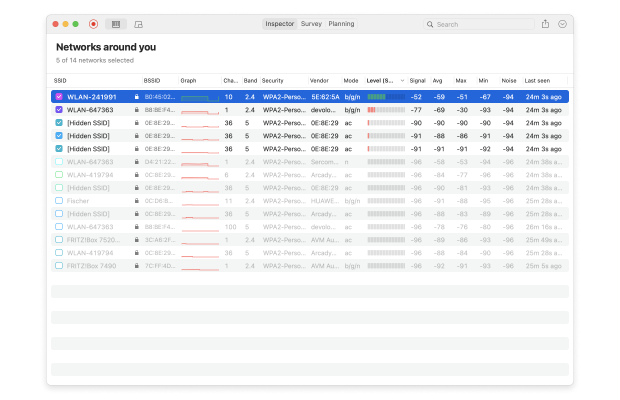
It allows you to instantly and clearly assess:
- Number of networks in range
- Which bands and channels are occupied (2.4/5/6 GHz)
- Channel width used (especially 40 MHz and 80 MHz)
- Signal strength from nearby access points
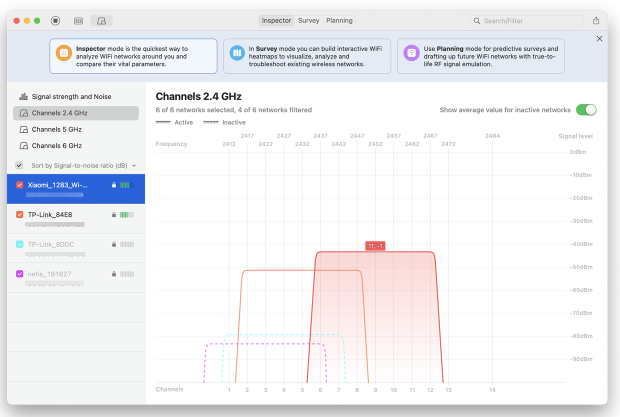
Completing this procedure before deploying equipment provides additional options. You can modify the channel plan, reduce cell size, or restrict certain radios to narrower channels (for example, forcing 20 MHz where 80 MHz looked tempting on paper). And most importantly, you avoid designing blindly.
This process also helps determine the real capabilities in a given space. For example, if the 5 GHz band is already congested and the customer base supports 6 GHz, it becomes the best option for creating high-performance zones. If you are limited to the 2.4 GHz band due to device or coverage limitations, you will need to exercise more rigorous design control, possibly even disabling some radios to avoid interference.
In short, RF planning isn't just about coverage; it's also about fault tolerance. You're creating a space where multiple networks coexist, and your job is to ensure the network operates smoothly when everyone is online. A few hours spent gathering real-world RF data at the outset will save you days of troubleshooting later.
Wi-Fi Deployment Validation: Planning, Coverage, and Capacity
The first step in Wi-Fi deployment isn't simply installing access points, but asking "what happens if we place them like this?" before purchasing and installing equipment. In high-density environments, assumptions quickly lead to significant costs, especially if, after installation, coverage is uneven and full of dead spots.
This is where predictive design tools can save time and reduce risk. In NetSpot's planning mode, you can simulate your space, place virtual access points, and see what signal strength, coverage, and overlap might look like — all without installing a single device.
Based on existing floor plans, you can specify actual room structural elements, their thickness and material, experiment with access point placement, set their transmit power, and even select specific models from a library or add your own parameters.
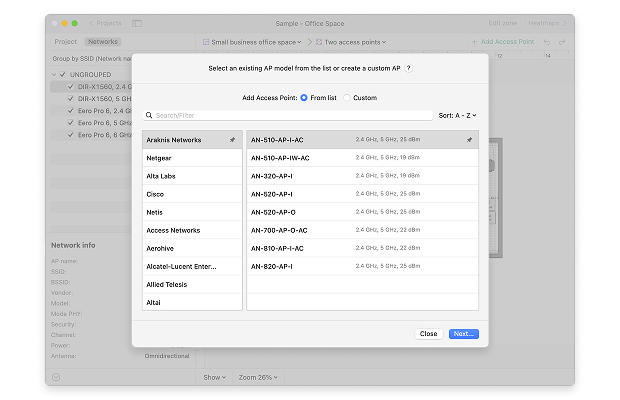
This simulation doesn't replace on-site measurements, but it gives you a reliable starting point. You know how many access points you might need, where they should be placed, and what layout will minimize interference.
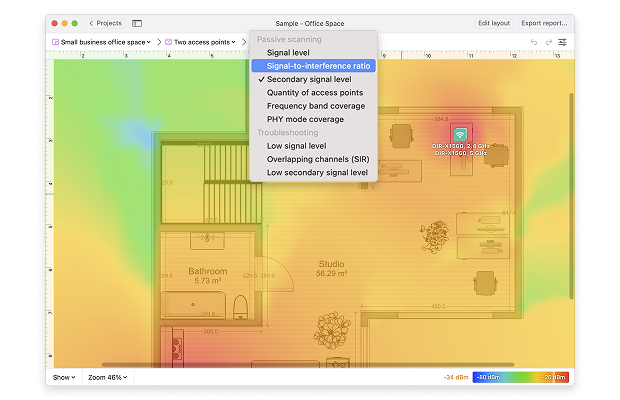
Once the access points are placed, this plan needs to be tested in real-world conditions. Just because the room layout appears balanced doesn't mean the air quality will be the same. This is where survey-based measurements come in handy. Using Wi-Fi heat map software, you can walk the room and collect real-time data on signal level, background noise, and signal-to-noise ratio (SNR).
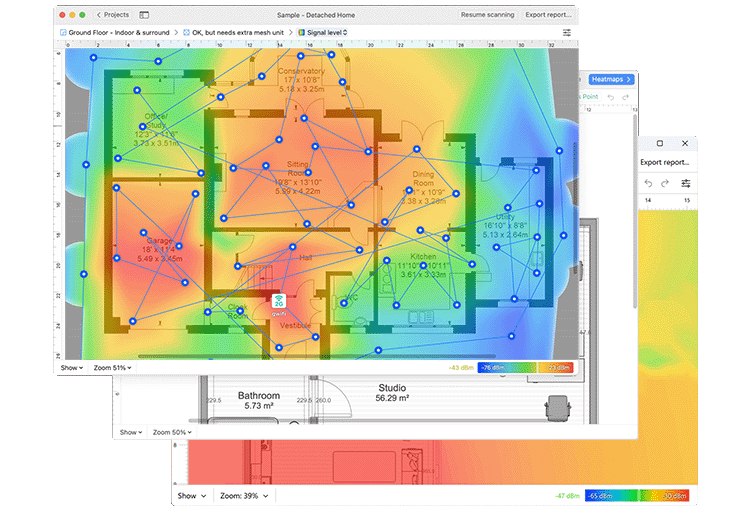
This turns assumptions into Wi-Fi heat maps — easy to understand and make decisions. You'll quickly see if coverage is weak in certain areas or if access points are competing rather than complementing each other.
Coverage is just one layer. Wi-Fi at an event also fails when the wired side can't keep up. Your backbone network may look fine in a spreadsheet, but actual throughput depends on how clear the upstream connection is — and whether it can handle peaks. Active scanning lets you check actual download and upload speeds from different areas of the room, so you're not caught off guard during peak traffic times.
The goal here isn't perfection — it's visibility. You want to identify problems while there's still time to fix them. Planning tells you what should work. Surveys show you what actually works. And bandwidth tests will help you determine whether the bottleneck is the cable, not the air.
Reducing Risk in Event Wi-Fi Deployment
It’s worth remembering that simplicity is often the difference between a Wi-Fi deployment that survives a busy event and one that slowly falls apart under pressure. The more moving parts you introduce, the harder it becomes to understand what’s actually happening when something goes wrong — especially when there’s no time for deep troubleshooting.
In practice, risk mitigation begins with simplifying the architecture. Every additional link — be it extra wireless hops, complex failover schemes, or redundant configurations — increases the likelihood that a minor issue will escalate into a major outage. At high-density events, the most stable Wi-Fi networks are those whose logic is easily explained and calculable, even under load.
Where possible, access points should be connected directly to the wired infrastructure. Mesh connections consume valuable airtime that could otherwise be used to serve clients, and this is especially noticeable in crowded environments.
If mesh connections are unavoidable, it's important to treat them as a necessary measure: minimize coverage, avoid placing high-traffic areas behind mesh links, and carefully monitor their operation during the event.
Preparing for failures is also part of the risk mitigation strategy. No matter how carefully you design your event Wi-Fi, things will go wrong. A cable gets damaged, a power injector fails, an access point gets unplugged or simply vanishes. Maybe a VIP area suddenly loses signal. Maybe someone sets up a rogue AP in the expo hall. It happens.
That’s why preparing for failure is part of any solid risk mitigation strategy. Having spare equipment on-site isn’t overkill — it’s just common sense. In a high-density environment, reliability doesn’t come from hoping for perfection. It comes from being ready to respond.
When things do break, you’ll need more than just controller logs or guesswork. Real-time visibility into what’s actually happening on the ground makes all the difference. Using a Wi-Fi analyzer on site makes quick wireless checks possible. You can walk straight to the problem area and see signal levels, SNR, nearby interference, and current channel conditions in real time. This helps you troubleshoot faster, avoid guesswork, and clearly understand what’s actually happening when an issue pops up.
Conclusion
Wi-Fi deployment at a large event is never trivial, but it’s far from impossible. Most problems trace back to one thing: skipping proper planning or working without real data.
Start by understanding what users on site actually need. Base your design on that — not on assumptions. Measure, test, and walk the floor before it fills up.
With solid preparation and the right tools in hand, you’ll be ready when the doors open and the crowd connects.
SO, WE RECOMMEND

NetSpot
FAQ
What configuration choices tend to make or break WiFi at a crowded event?
Most failures come from the same few decisions people make while they set up WiFi: channels that are too wide for the room, transmit power pushed too high, and no clear band plan (2.4 for compatibility, 5/6 for the bulk of clients). Fix those first, then re-check on the floor.
Do I actually need a separate guest network for an event?
If attendees are on the network, a separate guest WiFi network keeps public devices away from anything operational. It also makes troubleshooting less messy, because you’re not mixing “staff stuff” and “everyone’s phones” in one place.
What baseline should the venue have in place before we worry about density and capacity?
A stable uplink, clean wiring, and predictable placement. If the venue can’t get WiFi at home-level stability when the room is empty, the crowd won’t “average out” the problem — it will amplify it.
Why does WiFi feel bad even when the signal looks strong everywhere?
Because the limit is airtime. When you set up WiFi with lots of overlap and wide channels, devices spend more time waiting and retrying. Users experience it as lag and stalls, not “weak signal”.
How can a guest network improve the experience, not just security?
A properly separated guest WiFi network reduces collateral damage. One overloaded group of clients is less likely to drag everything else down.

Get NetSpot for Free
Wi-Fi Site Surveys, Analysis, Troubleshooting runs on a MacBook (macOS 11+) or any laptop (Windows 7/8/10/11) with a standard 802.11be/ax/ac/n/g/a/b wireless network adapter. Read more about the 802.11be support here.