Wi-Fi Site Surveys, Analysis, Troubleshooting runs on a MacBook (macOS 11+) or any laptop (Windows 7/8/10/11) with a standard 802.11be/ax/ac/n/g/a/b wireless network adapter. Read more about the 802.11be support here.
Wireless Network Assessment: How to Evaluate and Improve Your Wi-Fi Performance
Learn what a wireless network assessment is, why it matters, and how to evaluate Wi-Fi coverage, interference, and performance to keep your network fast and reliable.
Wi-Fi has become the backbone of modern connectivity. Offices rely on it for cloud applications and video meetings, warehouses use wireless scanners and IoT devices, and even homes now connect dozens of smart gadgets to a single network.
But as the number of devices grows, wireless environments become more complex. Signals interfere with each other, coverage becomes uneven, and networks that once worked perfectly start showing signs of instability.
This is where a wireless network assessment comes in.
Instead of guessing why your Wi-Fi feels slow or unreliable, a proper wireless assessment analyzes the wireless environment and reveals what’s really happening inside your network.
Jump to...
What Is a Wireless Network Assessment?
A wireless network assessment is a structured evaluation of an existing Wi-Fi network and the environment in which it operates.
The goal is simple: understand how the wireless infrastructure performs and identify factors that affect reliability, coverage, and security.
During a wireless assessment, specialists analyze several key aspects of the network, including signal strength, interference sources, device load, and configuration settings.
In practice, it’s very similar to a full health check for your wireless infrastructure.
Key Elements of a Wireless Network Assessment
A proper wireless network assessment focuses on several technical areas that directly influence Wi-Fi performance.Coverage and Signal Strength
One of the first things evaluated during a wireless assessment is signal coverage.
Wi-Fi signals behave differently depending on the environment. Walls, floors, furniture, and building materials can weaken or reflect radio waves, sometimes creating dead zones even when the router itself is powerful.
Mapping signal strength across the space helps determine whether devices receive a stable signal and whether access points are positioned correctly.
Interference and RF Noise
Wireless networks share the same radio spectrum with many other devices.
Neighboring Wi-Fi networks, Bluetooth devices, cordless phones, and even microwave ovens can generate interference that disrupts communication.
A wireless network assessment examines the RF environment to determine which channels are crowded and how surrounding networks affect performance.
Channel Usage and Congestion
In dense environments such as apartment buildings or office complexes, many Wi-Fi networks operate in the same frequency bands.
When several routers transmit on overlapping channels, devices must compete for airtime. This leads to slower speeds and unstable connections.
Analyzing channel distribution helps determine whether channel changes or different channel widths could improve performance.
Network Capacity
Another critical factor in a wireless assessment is network capacity.
Even with good signal strength, performance can degrade when too many devices connect to the same access point. Smartphones, laptops, tablets, and IoT devices all share the same wireless resources.
Evaluating device density and traffic patterns helps determine whether the network can handle current and future demand.
Wireless Security
Security is also an important part of any wireless network assessment.
Reviewing encryption standards, authentication mechanisms, and access policies ensures the network remains protected against unauthorized access and common wireless attacks.
Modern networks should rely on strong encryption protocols such as WPA2 or WPA3 to protect sensitive data.
How a Wireless Network Assessment Is Performed
Although methodologies vary slightly, most wireless network assessments follow a similar process.
Network Inventory
The first step is documenting the existing infrastructure.
Engineers collect information about routers, switches, and access points, including their locations, configuration settings, and operating channels. Understanding the current network layout provides the baseline for the assessment.
Site Survey and Coverage Analysis
One of the most important parts of a wireless network assessment is performing a site survey to understand how Wi-Fi signals actually behave inside the environment.
Radio waves rarely spread evenly through a building. Walls, furniture, metal structures, and even neighboring networks can influence how the signal propagates. As a result, areas that appear close to the router may still suffer from weak or unstable connectivity.
Once the wireless environment is mapped, dead zones and unstable areas become immediately visible.
Modern Wi-Fi analysis tools make this process much easier by transforming signal measurements into visual maps of wireless coverage. Instead of interpreting raw numbers, engineers can immediately see how signal strength, noise levels, and interference vary across the space.
For example, with tools like NetSpot, you can perform a wireless survey and generate detailed Wi-Fi heatmaps that visualize network behavior across a floor plan.
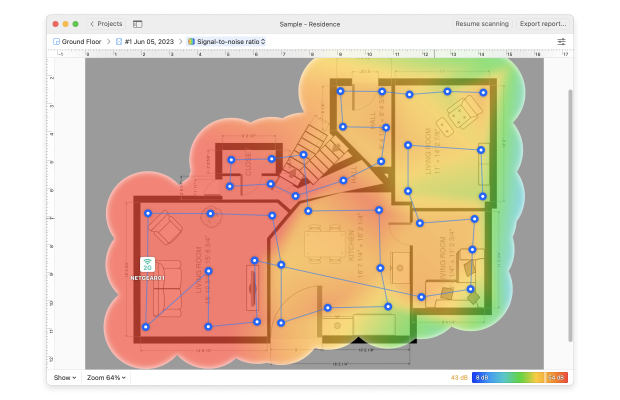
In Survey Mode, NetSpot offers more than 20 types of heatmaps, including signal level, signal-to-noise ratio, interference levels, and coverage distribution across different frequency bands.
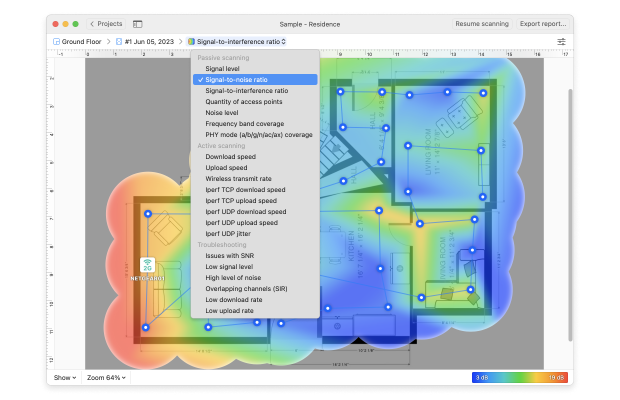
These visualizations provide a clear picture of the wireless environment and make it much easier to identify dead zones, overlapping channels, and areas where Wi-Fi performance can be improved.
Performance Testing
After coverage measurements are collected, engineers evaluate network performance.
This usually involves measuring throughput, latency, and packet loss to understand how the network behaves under real-world conditions.
Performance testing helps identify whether slow connectivity is caused by wireless limitations, congestion, or external network issues.
Data Analysis and Optimization
Finally, the collected data is analyzed to determine how the network can be improved.
Recommendations may include adjusting access point placement, changing channels, modifying transmit power levels, or upgrading hardware to support more devices.
These changes are designed to improve coverage, reduce interference, and ensure the network can handle future demand.
When You Should Perform a Wireless Assessment
Many organizations only perform a wireless network assessment after users start complaining about slow Wi-Fi.
However, assessments are most effective when performed proactively.
Common scenarios include:
- deploying a new wireless network
- expanding an office or facility
- supporting more connected devices
- troubleshooting unstable connectivity
- planning a network upgrade
Regular wireless assessments help ensure the network continues to meet evolving performance requirements.
SO, WE RECOMMEND

NetSpot
Wireless networks may seem simple on the surface, but maintaining reliable connectivity requires careful analysis of the wireless environment.
A structured wireless network assessment helps identify coverage gaps, detect interference, evaluate capacity, and improve overall network performance.
As Wi-Fi environments become more crowded and device-heavy, regular wireless assessments play an important role in keeping networks stable, secure, and ready for future growth.
Understanding what’s happening in the air around your network is often the first step toward building a faster and more reliable wireless experience — and tools like NetSpot can help visualize wireless coverage, detect interference, and reveal hidden issues that affect Wi-Fi performance.
FAQ
What’s the difference between a wireless assessment and a Wi-Fi site survey?
A “wireless assessment” is the broader term (health check: coverage + interference + performance + capacity). A site survey is often the measurement-heavy part of that assessment — especially when you build heatmaps and validate improvements after changes.
How long does a wireless network assessment take?
For a small home or small office, you can often get actionable results in a single session: scan, map key areas, fix one or two major issues, then retest. Larger spaces usually take longer because you need more sampling points and you may need to measure during peak usage hours.
What tools do I need for a wireless assessment?
At minimum you need a wireless analyzer to see channel congestion and signal metrics. If you want real clarity, add heatmaps and structured measurements — NetSpot is built for exactly that workflow (scan → heatmap → retest).
Why is my Wi-Fi slow even though my internet speed is high?
Because Wi-Fi is a shared radio medium. Congested channels, interference, poor AP placement, or too-wide channel width can cause retries and latency spikes even when your ISP link is fine.

Get NetSpot for Free
Wi-Fi Site Surveys, Analysis, Troubleshooting runs on a MacBook (macOS 11+) or any laptop (Windows 7/8/10/11) with a standard 802.11be/ax/ac/n/g/a/b wireless network adapter. Read more about the 802.11be support here.