WiFi Design Tool runs on a MacBook (macOS 11+) or any laptop (Windows 7/8/10/11) with a standard 802.11a/b/g/n/ac/ax/be wireless network adapter.
Best WiFi Design Software
Discover the best wifi design software for planning your wireless network before you buy any hardware.
Most people don't realize they can plan a WiFi network before even installing a single access point. But thanks to modern WiFi network design software, you can simulate signal coverage, test placement strategies, and select the right equipment virtually during the network planning stage.
Whether you're a small business owner, an IT consultant, a tech-savvy home user, or just a regular home user who wants stable WiFi in every room, these tools help you make smart decisions based on data — not guesswork.
To make this comparison useful for real buyers, we looked at each tool from the perspective of a practical WiFi design workflow: how easy it is to build a floor plan, how realistic the predictive model feels, which heatmaps are available, whether modern WiFi standards are supported, how much technical knowledge is required, and whether the software can also help after the network is installed.
For this guide, we compared the tools using a typical small-office/home-office planning scenario: a multi-room floor plan, mixed wall materials, multiple AP placement options, and the need to evaluate 2.4 GHz, 5 GHz, and — where supported — 6 GHz coverage. We also considered publicly visible product information, available platform support, user-facing feature sets, and first-party product statistics shown in the tools’ own materials, such as user review counts, supported platforms, and stated user base.
Jump to...
What Is WiFi Design Software and How Does It Work?
Essentially, WiFi network design software is a tool for modeling and planning wireless networks. Instead of guessing how far a signal will travel from an access point, you let the application's engine calculate how radio waves will behave in that environment.
In simple terms, WiFi design software answers three questions before you spend money on hardware:
- Where should the access points go?
- How many access points do you actually need?
- And which parts of the building may still have weak signal, interference, or poor band coverage?
Pretty much every tool in this space follows the same logic. You upload a floor plan, dial in the scale, and map out the walls — marking what’s drywall, concrete, or glass, since the app needs to know how each material kills the signal.
Then you populate the map with virtual access points. You can pick a specific model, such as Cisco or Aruba, from the manufacturer's database, or simply enter your own specifications, such as antenna power and radiation patterns.The software then runs a predictive survey to generate heatmaps for the essentials: signal strength, signal-to-noise ratio, channel overlap, and more.
You can test a wide variety of access point placement options. Change models, drag access points into hallways, adjust channel widths, or add more radios. You see the results instantly, meaning you're designing a network based on accurate data, not just hoping for the best.
This is the core idea of any serious WiFi network design software: design first, deploy later.
A good predictive design is not supposed to replace real-world validation. It helps you avoid obvious mistakes before deployment. After the access points are installed, a real site survey can confirm whether the design works as expected in the actual building, with real walls, furniture, people, neighboring networks, and client devices.
Top WiFi Design Software Tools in 2026
We gave more weight to tools that support both planning and validation, work with modern WiFi standards, provide useful heatmaps, are practical for more than one type of user, and do not force beginners into a fully enterprise-grade workflow from the first step.
Let’s break down the most popular and powerful tools available today.
Choice #1
NetSpot’s Planning Mode works as a virtual WiFi design studio, letting you model coverage and performance in advance so you can position access points as accurately as possible.
-

Inspector Mode
Gives you real-time insights into the WiFi networks around you..
-

Survey Mode
Provides a comprehensive, map-based analysis of your WiFi network's performance.
-

Planning Mode
Enables you to simulate and plan your WiFi network's layout and coverage.
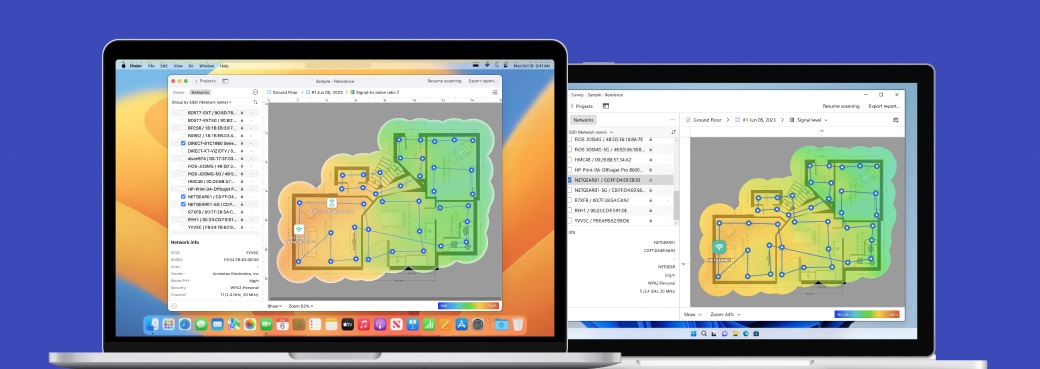
This tool offers powerful capabilities for professional Wi-Fi network planning, yet its interface is intuitive — it's equally intuitive for both novice and experienced wireless network engineers.
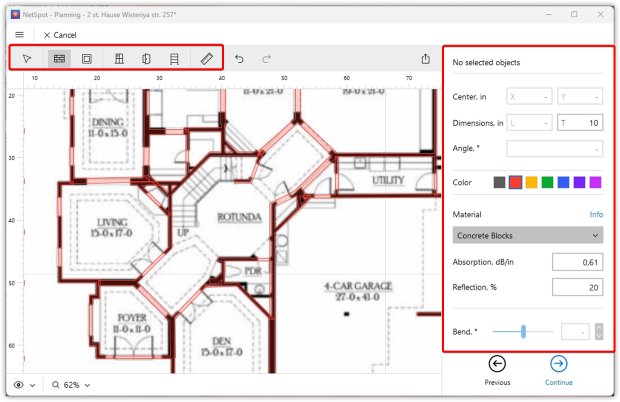
The floor plan editor makes it easy to sketch out walls, doors, and windows. Simply mark each element with the actual building material to account for thickness and signal loss. If you're working with an exotic material not included in the preset parameters, you can simply enter your own parameters.
This allows for a modeling experience that's as close to reality as possible, ensuring you know exactly how the Wi-Fi signal will behave on the site.
This is important for practical WiFi design because the same access point can behave very differently in a drywall apartment, a brick house, a concrete office, or a warehouse with metal racks. A planning tool that lets you define materials and thicknesses gives you a more realistic starting point than a simple “coverage circle” on a map.
NetSpot 6 implements an end-to-end approach to multi-story building design. Floors are no longer isolated from one another: you can combine multiple levels in a single project and simulate Wi-Fi signal propagation both horizontally and vertically.
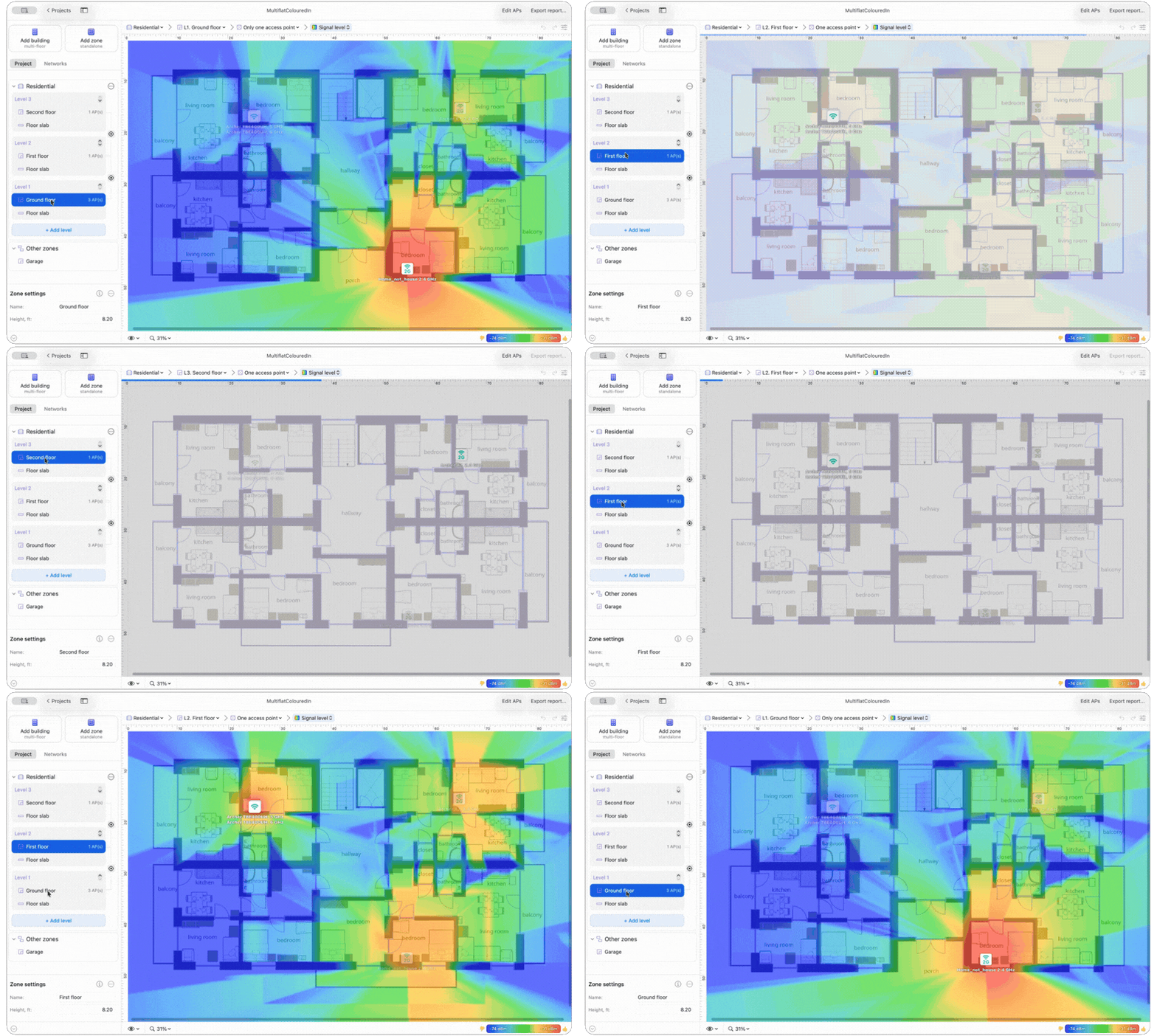
This ensures maximum accuracy in simulating the real-world RF environment and enables informed decisions on access point placement. The program takes into account the characteristics of interfloor structures, including their material and thickness, as well as any floor cutouts and open penetrations for staircases or atriums.
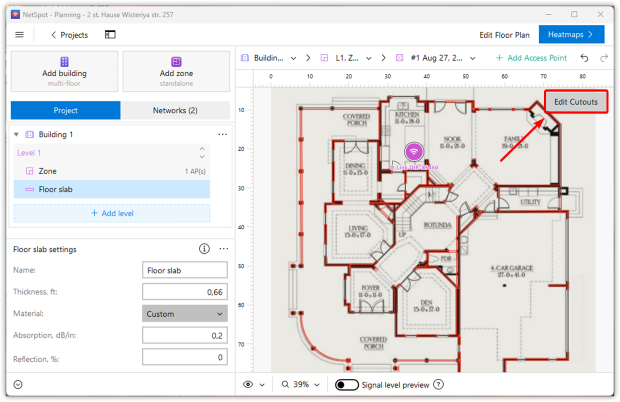
After accurately aligning floor plans, these parameters are integrated into the overall model, helping to accurately predict signal spread between levels.
In Planning Mode, you simulate the Wi-Fi network with nine targeted heatmaps:
- Signal Level
- Signal-to-Interference Ratio
- Secondary Signal Level
- Quantity of Access Points
- Frequency Band Coverage (2.4 GHz, 5 GHz, 6 GHz)
- PHY Mode Coverage (802.11 a/b/g/n/ac/ax/be)
- Low Signal Level Areas
- Overlapping Channels (SIR)
- Low Secondary Signal Level
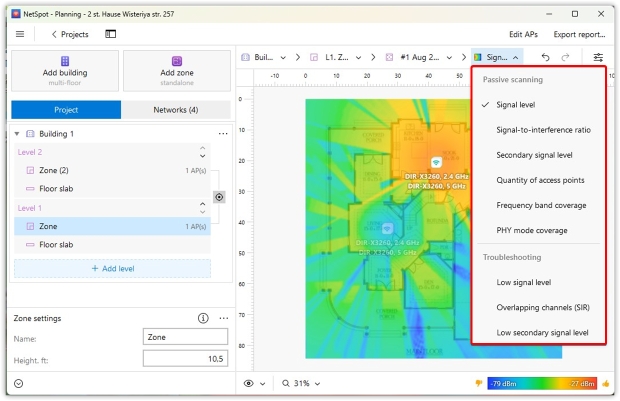
These WiFi heatmaps give you a clear picture of coverage quality, and interference risks before you even touch the hardware.
Signal Level shows whether the WiFi signal reaches each area; Signal-to-Interference Ratio shows whether other networks may interfere with it; Secondary Signal Level helps evaluate roaming; Frequency Band Coverage shows where 2.4 GHz, 5 GHz, or 6 GHz bands are available; and Overlapping Channels helps identify areas where nearby networks may compete for airtime.
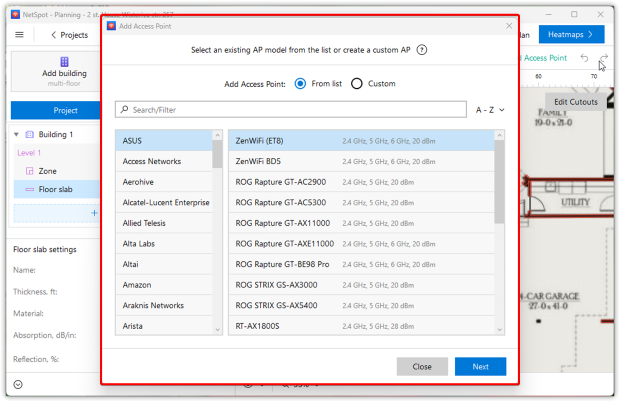
For the layout, the tool packs an extensive database of APs from all the major vendors. If your specific model isn’t there, it’s not an issue — you can quickly spin up a custom profile by dialing in transmit power, supported frequencies, and other key specs.
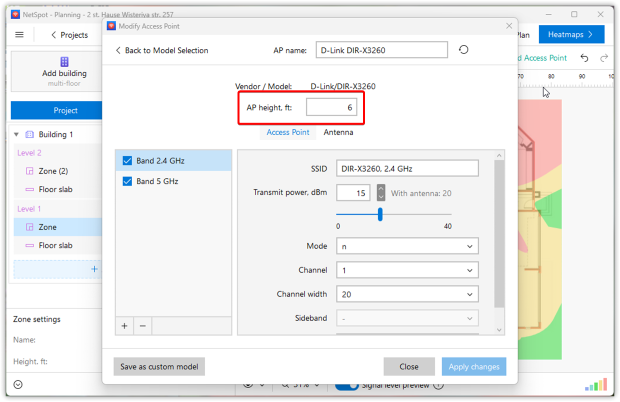
You can also set the AP mounting height, so the simulation accounts for its actual vertical position rather than treating every access point as if it were installed at the same level.
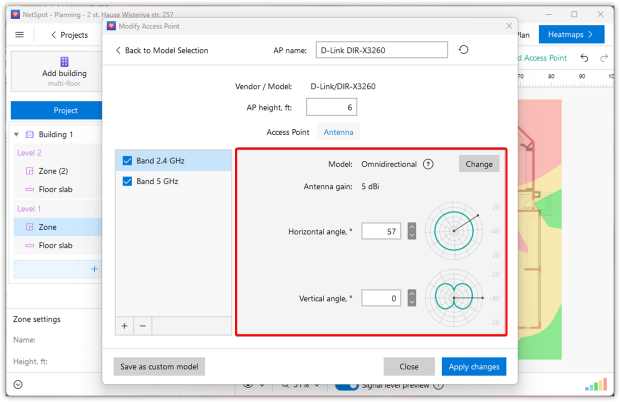
Antenna tuning is just as granular: you can switch between omnidirectional and directional antennas, tweak gain, and adjust tilt angles to mirror real installation scenarios and see how each change affects wireless coverage.
NetSpot also gives you immediate feedback while testing AP locations. You can preview the predicted signal spread before heatmaps are generated, and it updates in real time as you drag an AP around the plan.
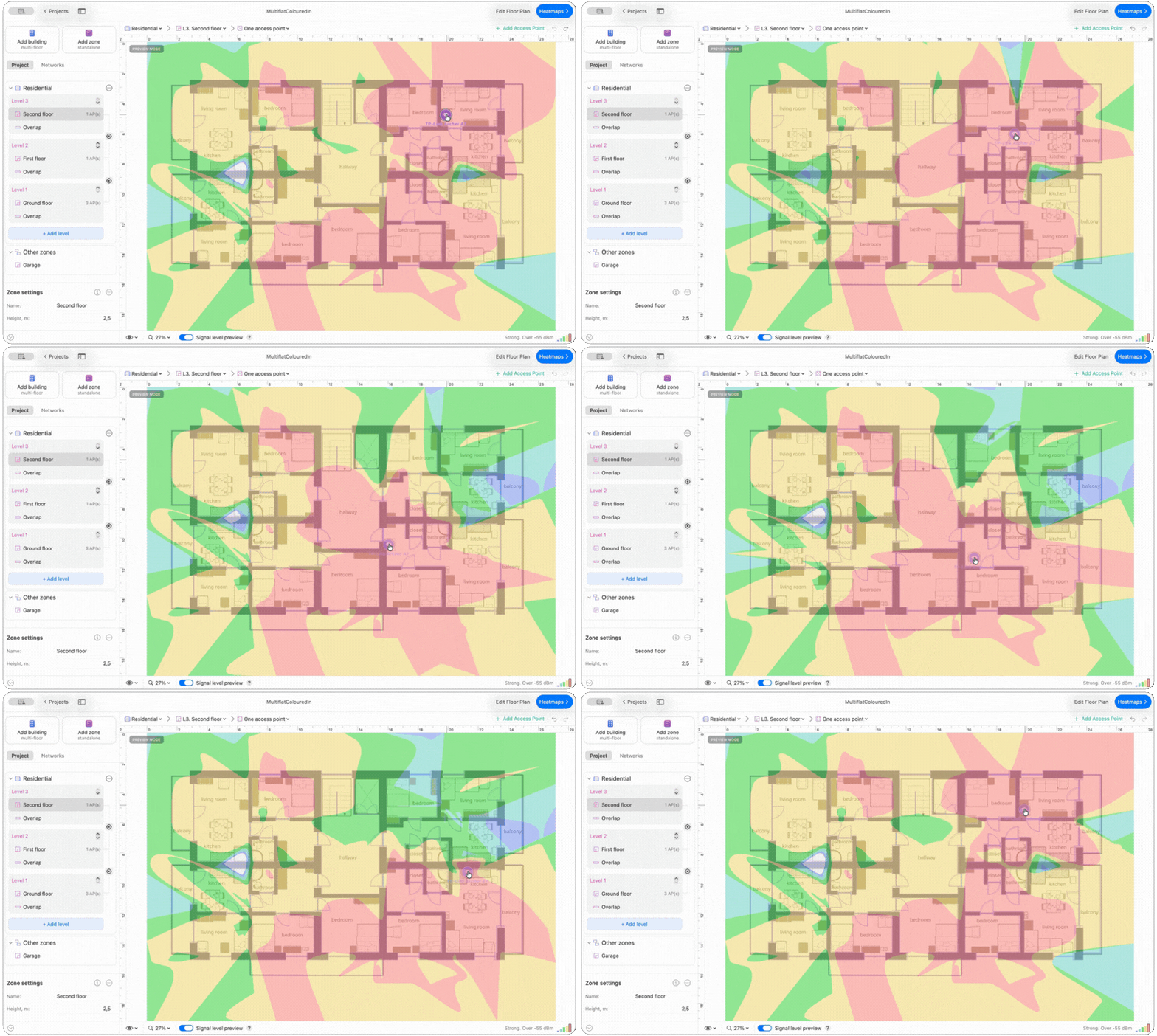
In an aligned multi-floor project, that preview extends between levels as well, so you can see how moving a point on one floor changes predicted coverage elsewhere in the building.
Another massive plus is that NetSpot has Planning Mode right in its Android app. You can put together, review, and edit your network design on a smartphone or tablet, completely skipping the need to pull out a laptop.
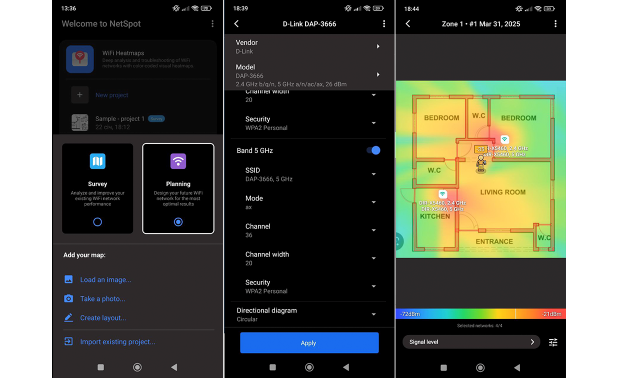
NetSpot has an excellent rating on Trustpilot, over 15 years on the market, and cross-platform support for Mac, Windows, and Android.
These numbers are useful trust signals because they show that the tool is not just a niche planner, but a mature product with a broad user base.
Ideal for:
Whether you're just fixing your home setup, managing office IT, or doing wireless for a living — this is for anyone who wants pro features without spending weeks on training or burning money on special gear and certs. It just works for designing, validating, and troubleshooting Wi-Fi.
Strengths:
NetSpot hits the sweet spot as a modern design tool with full Wi-Fi 6/7 and 2.4/5/6 GHz support, wrapped in an intuitive UI that works across Windows, macOS, and Android. Instead of forcing you to buy different tools, it gives you all three essentials — Planning, Survey, and Inspector modes — to handle your network from scratch to troubleshooting.
With custom structural materials, multi-floor design, floor slab parameters, cutouts, level alignment, and tweakable AP specs, its simulations can reflect a much wider range of real-world building conditions, while the crisp heatmaps lay out everything from signal drops to interference and throughput.
Limitations:
NetSpot doesn’t offer automatic AP placement for now, so you won’t find an AI-style “auto planner” that lays out access points for you with a single click.
Choice #2

Ekahau AI Pro
Available for Windows 10/11 (64-bit), macOS 11 and later.
Ekahau AI Pro is probably the most well-known WiFi design software in the enterprise space. It’s designed for business-critical WiFi where downtime is expensive and user density is high: hospitals, campuses, warehouses, large office deployments.
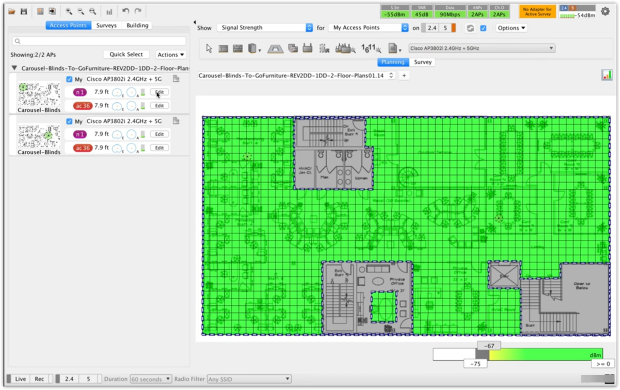
Ekahau lets you build AI-assisted predictive designs, run network upgrade simulations, and analyze both collected and live survey data. Its feature set includes AI Auto-Planner for optimal AP placement, an extensive database of thousands of APs and antennas, automatic channel planning, CAD import, advanced reflection/diffraction modeling, and template-based reporting. It’s optimized to work with the Ekahau Sidekick 2 hardware, which captures high-precision WiFi and spectrum data.
On the standards side, Ekahau supports design for 2.4/5/6 GHz networks, including WiFi 6E. The platform is clearly focused on staying ahead of new generations like WiFi 7, with tooling and content around upgrade planning.
Ideal for:
Ekahau is powerful, no doubt. But it’s a serious investment — best suited for corporate environments, university campuses, or anyone with an in-house networking team. If you’re on a budget, this may be too much.
Strengths:
You get deep control and visibility: capacity planning, high-density scenarios, SLA-driven design, multi-floor and multi-building projects, and rich reporting. For teams responsible for hundreds or thousands of APs, Ekahau’s ecosystem makes it much easier to standardize workflows and share designs across engineers.
Limitations:
Two obvious downsides: cost and complexity. Licenses, plus Sidekick hardware, are clearly priced for enterprises, not home users or very small businesses. And while the UI is well-designed, it assumes you understand RF basics and WiFi design concepts. This isn’t the tool you casually fire up once a year.
Choice #3

VisiWave Site Survey Pro
Available for Windows 7/8/8.1/10.
VisiWave Site Survey is a long-standing Windows-only solution that focuses on Wi-Fi site surveys and visualization, with predictive design capabilities unlocked in the Pro edition.
VisiWave Site Survey Pro, includes everything from the regular edition (builds coverage heatmaps, shows coverage voids, and visualizes channel usage and overlap) and adds full predictive site survey capabilities. Instead of only relying on real-world measurements, you can describe the survey area and let the software simulate RF behavior before you ever step on site.
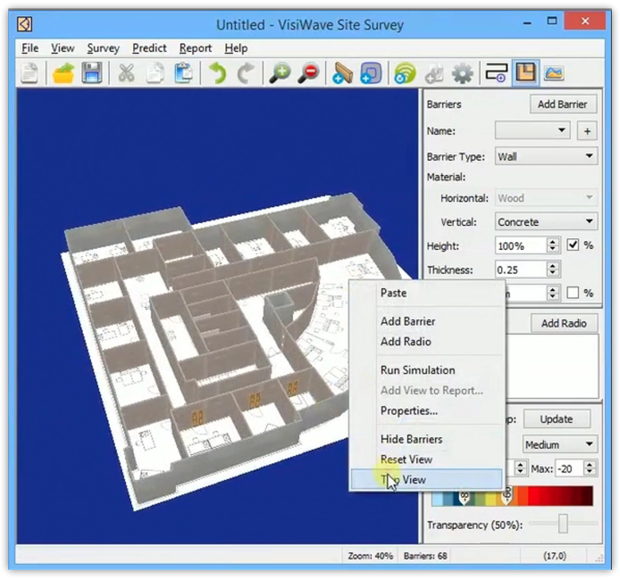
Inside VisiWave’s 3D editor you load a floor plan, draw walls and other barriers, assign materials, and place APs. The software then simulates RF propagation and overlays the result as a heatmap. VisiWave Pro also supports WiFi 6 / 802.11ax when paired with a compatible adapter.
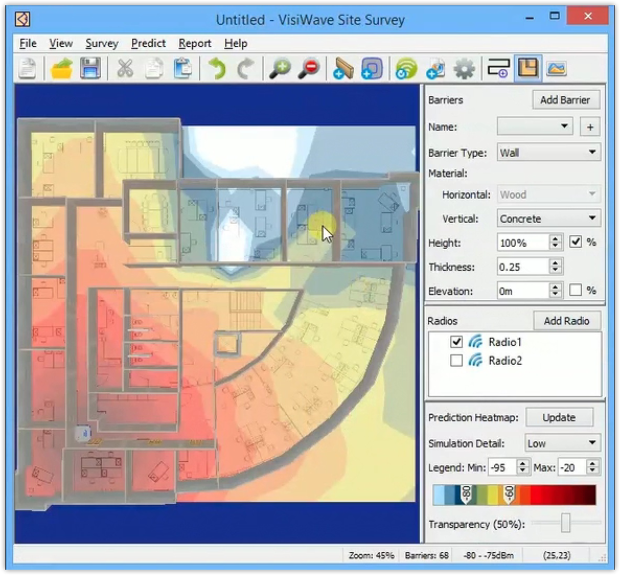
VisiWave Site Survey Pro also includes optimal radio placement assistance. You define the walls and tell the software how many access points you expect to use, and it suggests AP locations that should provide good coverage. You can even mark “priority areas” — for example, a cluster of desks or a seating zone where many users depend on WiFi — and VisiWave will bias its algorithm to favor coverage and performance in those zones.
Ideal for:
VisiWave Site Survey Pro is ideal for IT administrators and consultants comfortable with Windows tools and primarily focused on mapping and reporting without requiring a cutting-edge user interface. While the Pro version offers extensive planning capabilities, it's more of a classic survey tool than a fully-fledged, modern design platform.
Strengths:
VisiWave Site Survey Pro combines both survey and predictive modeling features, supports various data collection workflows, visualizes in Google Earth, and algorithmically places access points with priority zones. This is especially attractive if you want to remotely model sites or design Wi-Fi for buildings in the planning stage.
Limitations:
VisiWave only runs on Windows, the interface resembles a classic utility more than a modern cross-platform application, and advanced predictive functionality requires a Pro license.
Choice #4

Cambium Wi-Fi Designer
Available for: as a free, cloud-based tool in any modern web browser (no installation required).
Cambium Networks’ Wi-Fi Designer is a free, cloud-based planning tool designed specifically for Cambium WiFi deployments. It’s a browser-based wifi design software tool you can use from almost any modern device.
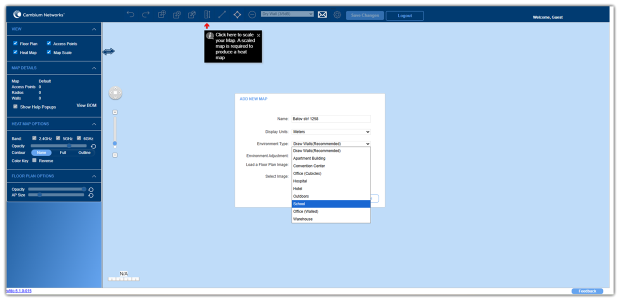
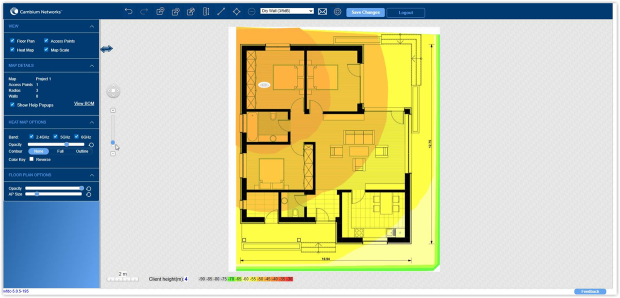
The workflow is simple: you upload or draw a floor plan, scale it, choose wall materials, and place Cambium APs on the map. The tool then produces predictive heatmaps so you can see whether your chosen hardware and placement will deliver the coverage you need. At the end, you get a bill of materials you can share or email — effectively a shopping list of APs for that design.
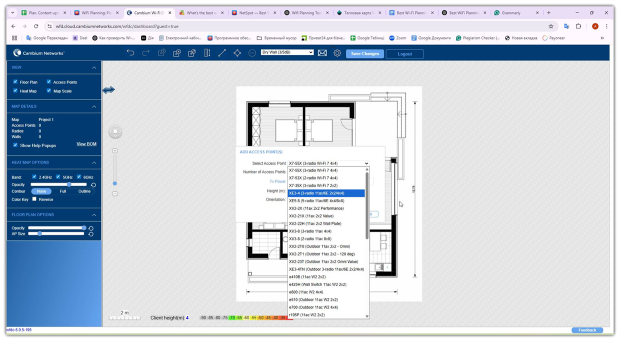
WiFi Designer is tuned for Cambium’s WiFi 6 solutions and integrates well into their broader cnMaestro management ecosystem once the network is deployed. It’s a nice bridge between planning on paper and a fully managed production network.
Ideal for:
Wi-Fi Designer is great if you want to “play” with predictive design. If you already use Cambium hardware, it makes sense. But for broader network planning, you’ll quickly outgrow it.
Strengths:
It’s free, easy to access, and focused on getting a working plan quickly. If your organization already uses Cambium APs, Wi-Fi Designer fits naturally into your workflow and helps standardize designs around that hardware.
Limitations:
The obvious trade-off is vendor lock-in: Wi-Fi Designer is really meant for Cambium APs, not generic multi-vendor designs. You also rely on an online service, which may be less convenient in highly regulated or air-gapped environments.
When Does It Make Sense to Use WiFi Design Software?
So when does it actually make sense to reach for WiFi design software instead of just installing an AP and “seeing what happens”? Here are the most common situations.
When you’re planning a brand-new network in a house, office, school, or warehouse and want to get AP counts and placement right on the first try.
When you’re refreshing old equipment — for example, moving from WiFi 5 to WiFi 6E or WiFi 7 — and you’re not sure if you can reuse existing locations or need to rethink the layout.
When you keep getting complaints about dead zones, dropped calls, or “slow corners” in your space and need to decide whether the fix is more APs, different APs, changed channels, or simply smarter placement.
When you’re expanding an existing network (new wing, extra floor, more conference rooms) and you want to see how additional APs will interact with what’s already there instead of just bolting on hardware.
When you’re budgeting for a future project and want a realistic idea of how many APs and which models you’ll actually need, rather than guessing line items in a spreadsheet.
In all these cases, wifi design software lets you replace “let’s try it and see” with “we know this design meets our coverage and capacity targets before we ever place an order”.
Final Verdict
Good Wi-Fi design software lets you back your next deployment with hard data instead of crossed fingers — and your users will feel that stability every time they connect. While all four tools replace guesswork with numbers, they target different crowds. No matter which tool you pick, the main rule is simple: design first, deploy second.
If you need an all-in-one tool to plan, survey, and fix things on the fly — without burning through an enterprise-sized budget — NetSpot is easily the most practical option. It gives you all the core perks of high-end design software, like virtual modeling, predictive surveys, and latest-gen standards, while remaining simple enough for tech-savvy users, consultants, and smaller IT teams to just pick up and use.
NetSpot combines predictive WiFi planning with real WiFi surveys and live network inspection. That matters because the same tool can help you design the network, check the design after installation, and troubleshoot problems later.
SO, WE RECOMMEND

NetSpot
Wi-Fi Site Surveys, Analysis, Troubleshooting runs on a MacBook (macOS 11+) or any laptop (Windows 7/8/10/11) with a standard 802.11be/ax/ac/n/g/a/b wireless network adapter.
FAQs
What is WiFi design software?
It’s a planning tool that models your building, walls, and access points to predict real-world coverage and performance before you buy or install hardware. Good WiFi design software also helps verify the results with on-site surveys later.
Do I need special hardware to use WiFi design software?
For predictive planning, no. You can design with a regular laptop. For on-site validation and spectrum analysis, some tools support dedicated adapters or survey devices, but they’re optional for basic planning.
Can Wi-Fi design software work with Wi-Fi 6, 6E, or even WiFi 7?
Yes, popular tools like Ekahau or NetSpot handle all modern standards very well. They can simulate networks in three bands simultaneously: 2.4 GHz, 5 GHz, and 6 GHz. The main thing is to ensure that your adapters and equipment support these frequencies. Otherwise, the programs will easily show the actual coverage area of new access points, help you find dead zones, and suggest where to change channels or add equipment.
How do I know how many access points I need?
There's no universal number. It all depends on the area, wall thickness, number of devices, and what people will be doing (watching videos, making calls, or just checking email). The best way to avoid guesswork is to upload the layout to a Wi-Fi design program. You can virtually place the points, move them around, and immediately see where the signal is excellent and where you need to add another point.
Which Wi-Fi design program should a beginner choose?
If you're new to this, NetSpot is the easiest to start with. It has a clear interface and is easy to use without any prior experience, allowing you to place points on a map or measure the actual signal at a site. Professional software like Ekahau AI Pro offers much more functionality, but it was designed for network engineers, is expensive, and requires a steep learning curve.
How accurate is predictive WiFi design software in real life?
Map-based predictive WiFi design is very accurate if you correctly specify the room dimensions, wall materials, and access point models. While there won't be a decibel match, the program will accurately determine the required number of access points and their installation locations. This eliminates guesswork. And once you've installed the network, all that's left to do is take final measurements on-site and fine-tune the settings.
What is the best WiFi design software overall?
For most home users, small businesses, consultants, and practical IT teams, NetSpot is the best overall choice because it combines WiFi planning, site surveys, and live inspection in one tool. For large enterprise deployments with dedicated wireless engineers and bigger budgets, Ekahau AI Pro is the stronger enterprise-grade option.

Get NetSpot for Free
Wi-Fi Site Surveys, Analysis, Troubleshooting runs on a MacBook (macOS 11+) or any laptop (Windows 7/8/10/11) with a standard 802.11be/ax/ac/n/g/a/b wireless network adapter.