Wi-Fi Site Surveys, Analysis, Troubleshooting runs on a MacBook (macOS 11+) or any laptop (Windows 7/8/10/11) with a standard 802.11be/ax/ac/n/g/a/b wireless network adapter.
Hotel Wi-Fi Design: Building Networks
Discover how to build a seamless, future-proof Wi-Fi system for your hotel with tools like NetSpot.
Optimize your network design with NetSpot’s Planning Mode. Ensure reliable connectivity, optimal coverage, and support for thousands of devices, seamlessly meeting the demands of the modern hotel industry.
Hotel Wi-Fi design is about mapping out network behavior before buying any hardware. You have to calculate how the signal travels, where devices will crowd, and how to handle security across different zones — from guest rooms to outdoor areas.
Instead of guessing the number of access points, a real design relies on the building’s layout and wall materials. The goal is to meet specific, technical targets for signal strength, SNR, throughput, and latency based on actual guest usage.
Jump to...
What is Hotel Wi-Fi Design and Why is it Important?
In modern hospitality, the quality of Wi-Fi has become an important indicator of a hotel’s standard. From a guest-experience perspective, reliable Wi-Fi directly affects reviews, support requests, business travelers, streaming, smart-room features, mobile check-in, digital keys, and staff workflows.
According to Shiji’s Guest Experience Benchmark report, published in January 2026 and based on 2025 hotel review data, the global Guest Review Index reached 86.7%. This supports a broader hospitality trend: guest satisfaction now depends not only on demand, but also on operational execution and technology maturity.
Hotel Wi-Fi design refers to the process of planning, installing, and managing a wireless network tailored to the unique needs of hotel environments.
Unlike residential or small office setups, hotels require networks that can handle high device density, provide uninterrupted coverage across expansive areas, and support both guest and operational requirements.

A well-designed hotel Wi-Fi network is the backbone of a positive guest experience, efficient internal operations, and adherence to modern technological standards. In this article, we will explore the key features of hotel Wi-Fi design, discuss the steps to build a high-quality network, and share practical tips for creating a seamless experience.
Key Features of Hotel Wi-Fi Design
Designing Wi-Fi for hotels isn’t the same as setting up a typical network. The unique challenges of the hospitality industry demand specialized solutions that cater to increasing guest expectations and operational efficiency.
Let’s take a closer look at the key aspects that make hotel Wi-Fi design distinct and explore how they contribute to creating a flawless network.
- High Device Density
Hotels aren’t just dealing with a handful of connected devices — they need to support hundreds or even thousands at the same time. Think of all the smartphones, laptops, tablets, and IoT devices used by both guests and staff. That’s where a capacity-based design comes in. By analyzing peak usage and bandwidth needs, hotels can prepare for high-traffic zones like lobbies during check-in or conference rooms hosting big events.
A practical rule is to estimate devices by zone, not only by room count. A standard guest room may have two to five active client devices, while a conference room, lobby, restaurant, or event space can create much sharper traffic peaks in a shorter time window. That is why hotel Wi-Fi planning should include separate capacity assumptions for guest rooms, meeting areas, staff zones, outdoor spaces, and back-of-house operations.
Features like Quality of Service (QoS) prioritize essential traffic, such as video calls or streaming, while load balancing ensures no single access point is overwhelmed. Splitting the network into segments for high-demand and low-usage areas adds an extra layer of stability, keeping everything running smoothly.
In practice, the busiest hotel Wi-Fi zones are often not the same as the largest zones. A small reception area during check-in, a breakfast room in the morning, or a conference room between sessions may place more stress on the network than a long corridor or a quiet guest-room wing. For this reason, hotel Wi-Fi design should combine coverage planning with capacity planning, especially in areas where many devices connect at the same time.
- Comprehensive Coverage
Guests expect reliable Wi-Fi everywhere, whether they’re binge-watching in their rooms, catching up on work in the lobby, or scrolling through social media by the pool. Achieving this level of coverage takes more than just good hardware; it requires strategic WiFi planning. Tools like NetSpot play a big role here, offering predictive site surveys and real-time heatmaps to pinpoint weak spots and optimize access point placement.
Coverage should be evaluated not only by whether the Wi-Fi signal reaches an area, but also by whether it is strong and stable enough for what guests or staff actually do there. A guest room used for streaming or video calls, a conference room full of laptops, and a back-office area with operational devices may all require different signal quality and performance targets.
This is why a hotel Wi-Fi heatmap should be read together with the floor plan, wall materials, expected usage, and band coverage for 2.4 GHz, 5 GHz, and 6 GHz where supported.
The most common reason hotel Wi-Fi works in the lobby but feels weak in guest rooms is not always the internet connection itself. It may be weak signal after walls, poor AP placement, overloaded access points, channel interference, or a roaming gap between APs. A Wi-Fi site survey helps separate these causes instead of treating every complaint as an ISP problem.
- Interference Management
Interference is one of the biggest hurdles for hotel Wi-Fi. Internal equipment like elevators and kitchen appliances, along with external factors like neighboring networks, can wreak havoc on signals. Managing interference means carefully placing access points and selecting Wi-Fi channels to reduce conflicts. Tools like NetSpot help detect interference sources and optimize settings for better performance.
In hotels, interference is often location-specific. A guest room facing neighboring buildings may see many outside networks, while a kitchen, service corridor, or elevator area may suffer from non-Wi-Fi noise or heavy signal attenuation. This is why the same SSID can feel fast in one part of the property and unstable in another.
Advanced features like Dynamic Frequency Selection (DFS) let access points automatically switch channels to avoid radar interference. Add in the right antennas — directional for focused coverage or omnidirectional for wider areas — and you’ve got a recipe for crystal-clear connectivity.
For dense hotels, channel planning should avoid simply increasing transmit power. More power can make APs “shout” over each other, increase co-channel contention, and create sticky-client behavior. In many cases, the better fix is lower AP power, cleaner channel reuse, more precise placement, and enough APs to support capacity without excessive overlap.
- Security
When it comes to guest data and hotel systems, there’s no room for compromise. Robust security measures, such as enterprise-grade firewalls, role-based access control (RBAC), and strong encryption, are essential. Network segmentation is another must, keeping guest traffic separate from critical hotel operations like payment processing and IoT systems. Real-time monitoring tools make it easier to catch vulnerabilities before they become problems, while regular audits and firmware updates ensure the network stays ahead of emerging threats.
Security should be designed as part of the Wi-Fi architecture, not added at the end. Guest Wi-Fi, staff devices, POS systems, cameras, smart TVs, door locks, building management systems, and IoT devices should not all live on the same flat network. VLANs, access policies, client isolation, captive portal rules, and secure authentication help limit risk while keeping the guest experience simple.
Steps to Create a High-Quality Hotel Wi-Fi Network
Creating a reliable hotel Wi-Fi network requires a carefully structured approach, with each stage playing a vital role in ensuring seamless connectivity. The process starts with the basics and gradually moves toward tackling more detailed technical aspects. Overlooking any step can compromise performance, making it essential to approach each phase with precision and thoroughness.
Starting with site analysis and strategic equipment selection, and following through with detailed configuration and rigorous testing, hotels can establish a network that meets current demands while remaining adaptable for future growth.
A strong hotel Wi-Fi design process usually follows this order: define user requirements, inspect the building, create a predictive design, validate it with a real survey, optimize configuration, and then monitor performance over time. Skipping the validation step is one of the most common reasons a “good-looking” network design still fails in real guest rooms.
1. Site Survey and Analysis: Understanding Baseline Conditions
Before designing a hotel Wi-Fi network, it’s essential to evaluate the property’s baseline conditions. A hotel’s architectural and technical infrastructure play a crucial role in Wi-Fi performance. Factors such as the number of floors, building materials, room layouts, and the placement of equipment like elevators and HVAC systems must be carefully considered.
Concrete walls can weaken signal strength by up to 50%, while glass reduces it by about 10%. These challenges, combined with electromagnetic interference from technical systems, can create dead zones and degrade connectivity.
NetSpot WiFi Planner helps account for these structural factors during the design phase. For example, planners can model how signals travel through concrete, drywall, or glass and adapt AP placement to counteract attenuation.
Starting with NetSpot 6, Planning mode supports both single-level spaces and entire multi-floor buildings. For a hotel, each floor can be added as a separate level within the same project, so the property can be planned as one connected environment.
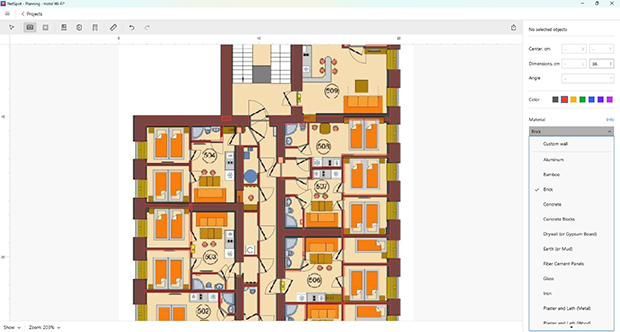
The building materials selection panel in NetSpot’s Planning mode
For multi-story properties, the WiFi simulation accounts for the floor slabs between levels: planners can specify their material and thickness and add cutouts for stairwells or other openings where the slab is absent.
After the floors are aligned, NetSpot models signal propagation not only horizontally across each level but also vertically through the building.
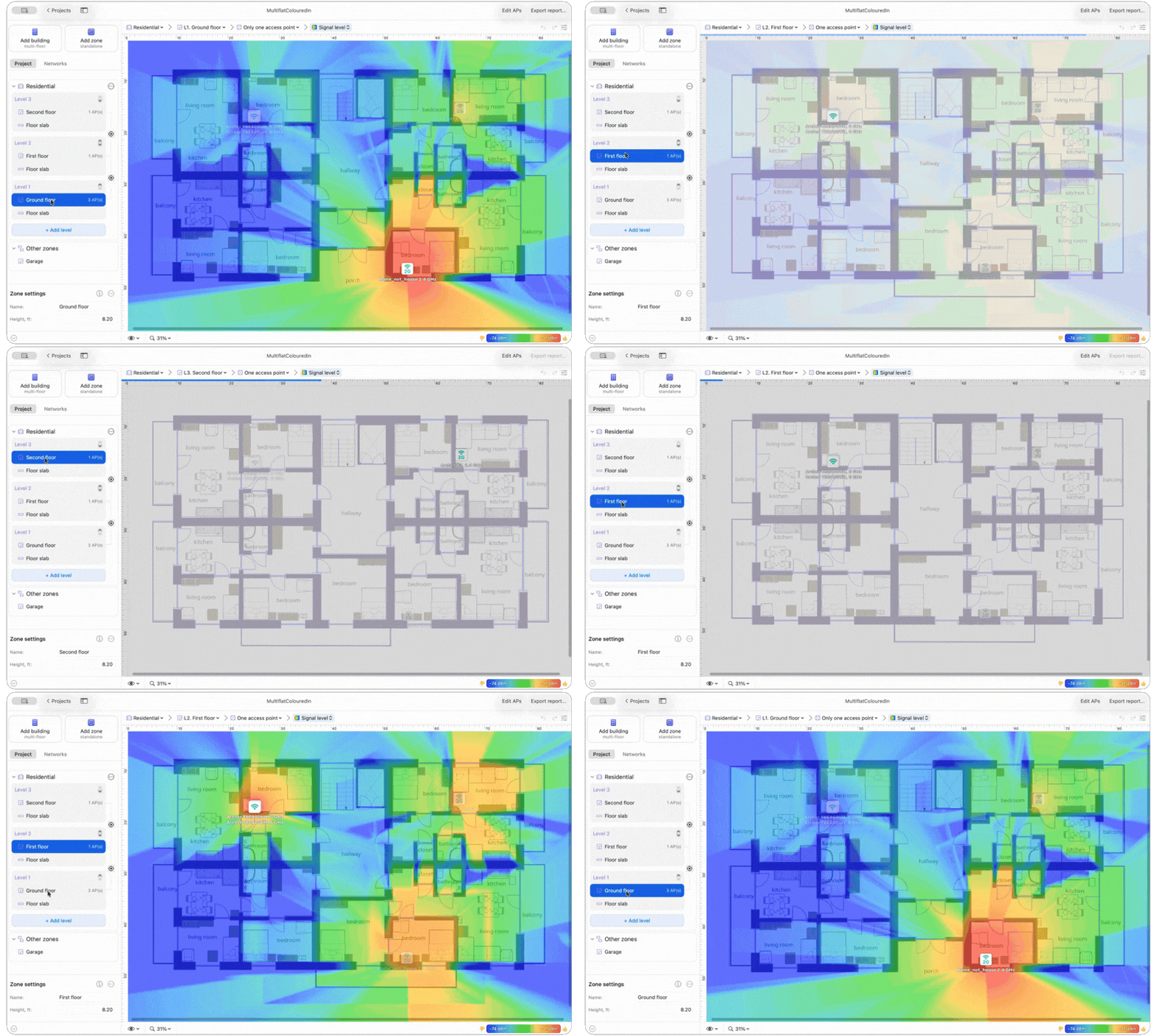
This brings the simulation closer to real-world RF behavior, where an AP installed on one floor may also contribute coverage above or below, and provides a more realistic basis for access point placement throughout the hotel.
2. Equipment Selection and Placement
The success of a hotel Wi-Fi network heavily depends on choosing hardware that can efficiently manage high device traffic and seamlessly adapt to the property's distinct layout and operational needs. Choose high-performance access points (APs) that support advanced standards like Wi-Fi 6 and Dynamic Frequency Selection (DFS). Ensure adequate power-over-Ethernet (PoE) switches for seamless AP integration.
Enterprise-grade APs, routers, and antennas ensure reliable connectivity across diverse environments.
- Directional Antennas focus signals on specific areas like outdoor patios or meeting spaces, enhancing targeted coverage.
- Omnidirectional Antennas deliver uniform coverage, ideal for lobbies, dining areas, or hallways.
- High-Density APs handle heavy device traffic in areas like event halls or busy lobbies, maintaining smooth connectivity during peak usage.
NetSpot’s Planning mode streamlines the equipment selection process, offering a virtual environment to test and optimize hardware configurations. With its built-in library of pre-configured models, users can simulate signal behavior and assess equipment performance without purchasing it. If a specific model isn’t listed, custom specifications can be added, enabling precise simulations tailored to the hotel’s needs.
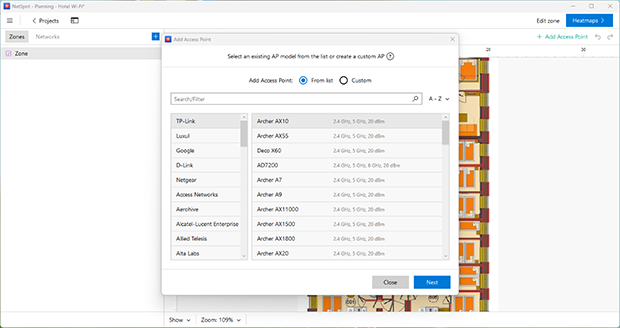
AP Selection Window in NetSpot’s Planning mode
This mode also identifies the optimal placement of APs by factoring in signal strength, interference, and coverage gaps.
By integrating NetSpot’s Planning mode, hotels can design a cost-effective, high-performing network that meets current demands and scales efficiently for future growth.
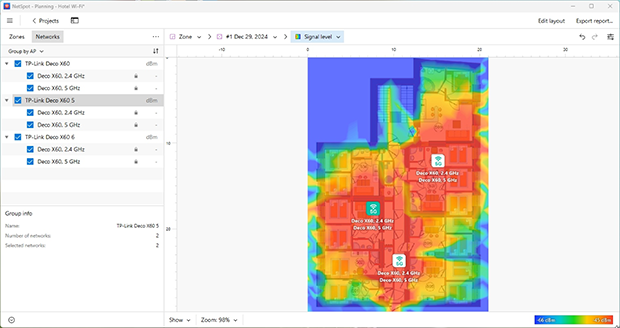
Predicted Signal Coverage Map in NetSpot’s Planning mode
This comprehensive approach ensures the right equipment is selected and positioned for optimal connectivity.
3. Network Configuration
After selecting the right hardware for your hotel Wi-Fi, the next critical phase is configuring channels and optimizing the frequency plan. Proper channel management ensures efficient resource distribution and minimizes interference, which is essential for high-performance networks.
Prioritize 5 GHz and 6 GHz bands for high-density areas where faster speeds and lower interference are required, while reserving 2.4 GHz for legacy devices with broader coverage needs. To further reduce interference and maximize available channels, use 20 MHz channel widths, particularly in environments with multiple overlapping networks.
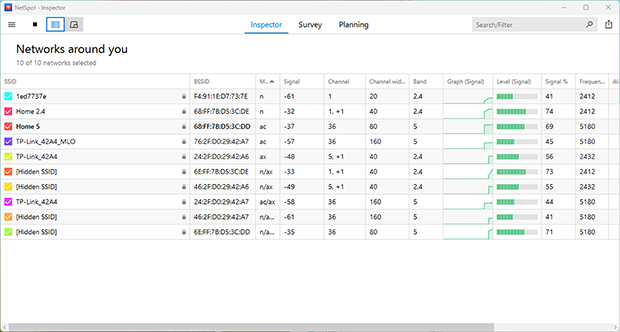
Inspector Mode in NetSpot
Tools like NetSpot streamline this process by identifying congested channels and providing visualizations of interference sources. If your equipment supports Dynamic Frequency Selection (DFS), enable it to dynamically adjust channels and avoid conflicts, especially in urban areas or near airports.
Regular monitoring and fine-tuning of channel usage will help prevent bottlenecks, ensure stability, and deliver exceptional performance for both guests and staff.
4. Testing and Optimization
Before making the Wi-Fi network operational, conducting rigorous testing is essential to ensure optimal performance. After deployment, utilize NetSpot’s Survey Mode to generate detailed Wi-Fi heatmaps, which visually represent signal strength, noise levels, and interference across the entire property.
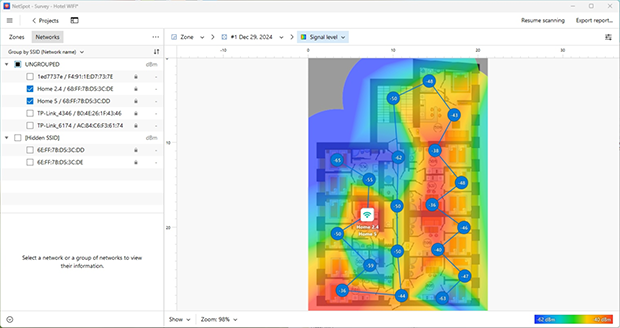
Signal level Wi-Fi heatmap in NetSpot’s Survey mode
These heatmaps are invaluable for identifying dead zones, areas with overlapping Wi-Fi signals, and other connectivity issues, enabling precise adjustments to access point placement and channel configuration.
Additionally, NetSpot provides tools to evaluate critical performance metrics like throughput and latency in high-traffic zones, such as hotel lobbies, conference rooms, and other communal areas. This ensures the network can handle peak traffic demands without compromising the user experience.
5. Continuous Monitoring and Maintenance
Wi-Fi networks are dynamic systems that evolve with changes in user behavior, device types, and environmental factors. Ongoing monitoring and maintenance are essential to maintain optimal performance and adapt to these changes. Key practices include:
- Real-Time Analysis: Monitor performance metrics such as bandwidth usage, signal strength, and device connections to identify potential issues early. Use tools like NetSpot Wi-Fi analyzer to track real-time data and gain actionable insights.
- Firmware Updates: Regularly update the firmware of routers, access points, and other network devices to address security vulnerabilities, introduce performance enhancements, and ensure compatibility with newer technologies.
- Proactive Maintenance: Conduct routine inspections and diagnostics to prevent hardware failures and optimize configurations. This includes checking for wear and tear on cables, ensuring proper AP placement, and verifying that all devices operate within recommended parameters.
- Heatmap Reassessment: Periodically reassess coverage using survey tools to detect new interference sources or changes in signal patterns due to environmental modifications, such as newly installed furniture or renovations.
By implementing these strategies, hotel IT teams can quickly detect and address network issues, ensuring uninterrupted service and high-quality connectivity for guests and staff alike.
Practical Tips for Hotel Wi-Fi Design
- Focus on Capacity in High-Traffic Areas: Balance coverage with the ability to handle dense device usage in key zones.
- Invest in Enterprise-Grade Hardware: Avoid consumer-grade equipment to ensure long-term reliability and scalability.
- Avoid Hallway AP Placement: Place APs in guest rooms or central locations to minimize signal degradation and interference.
- Separate Networks for Guests and Staff: Use VLANs (virtual local area network) to enhance security and prioritize critical operations.
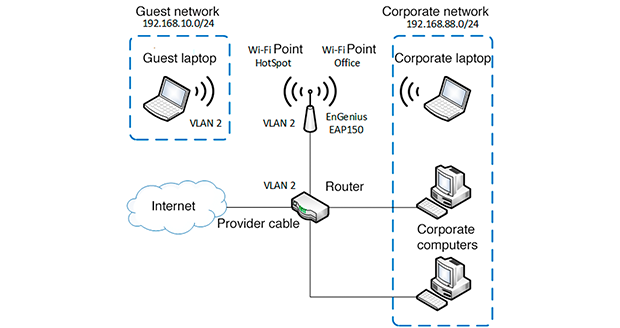
Scheme of VLAN-based network segmentation
- Future-Proof the Design: Plan for new technologies like Wi-Fi 6E and IoT integration to accommodate evolving demands.
- Optimize for Device Diversity: Ensure the network is compatible with a wide range of devices, from older laptops to the latest smartphones, without compromising performance.
- Utilize Network Redundancy: Design the network with backup solutions such as redundant APs or dual-band configurations to ensure uninterrupted service during hardware failures or maintenance.
Conclusion
Designing a high-capacity Wi-Fi network for hotels requires meticulous planning and the right WiFi design software tools. With NetSpot’s powerful features, you can visualize, plan, and optimize your network to deliver seamless connectivity for guests and staff. By focusing on capacity-based design, you ensure a future-proof solution that meets the growing demands of modern hospitality.
Periodic reviews and updates to the network are essential for maintaining its effectiveness, ensuring your hotel remains competitive in providing top-tier wireless services.
The strongest hotel Wi-Fi designs are built on measurable data: predictive planning before deployment, real survey validation after installation, and ongoing monitoring as guest behavior changes. For hotel owners and IT teams, this approach reduces guesswork, helps prevent recurring complaints, and supports the connected services guests now expect — from streaming and video calls to mobile keys, smart rooms, staff tools, and secure business operations.
For the best long-term result, treat hotel Wi-Fi as part of the guest experience, not as a one-time hardware purchase. A properly planned and regularly validated Wi-Fi network can improve guest satisfaction, reduce support workload, and make the property more ready for future technologies such as Wi-Fi 6E, Wi-Fi 7, IoT expansion, and location-aware guest services.
SO, WE RECOMMEND

NetSpot
Hotel Wi-Fi Design FAQ
What is hotel Wi-Fi design?
Hotel Wi-Fi design is the process of planning access point placement, coverage, capacity, channels, roaming, security, and performance for a hotel property. It accounts for guest rooms, lobbies, conference areas, outdoor spaces, staff systems, IoT devices, and building materials.
How many access points does a hotel need?
There is no fixed number that works for every hotel. It depends on the size of the building, wall materials, room layout, number of guests, expected devices, AP model, and the Wi-Fi bands you plan to use. The most reliable way to estimate the number of APs is to build a predictive plan first and then confirm it with a real site survey.
Should hotel APs be placed in hallways or rooms?
It depends on the building, but hallway-only placement is often not ideal. The signal may look strong in the corridor, then lose a lot of strength once it passes through doors, bathroom walls, mirrors, furniture, and other obstacles. In many hotel layouts, testing AP placement closer to the rooms — or inside selected rooms — gives better in-room coverage.
Is Wi-Fi 6E useful for hotels?
Wi-Fi 6E can be useful, especially in busy hotels where the 5 GHz band is already crowded. The 6 GHz band gives compatible devices more room to work with and usually has less interference. The trade-off is range: 6 GHz does not travel through walls as well as 2.4 GHz, so it needs careful planning and should not be treated as a simple drop-in replacement for older bands.
Why is hotel Wi-Fi slow even when the signal looks strong?
A strong signal does not always mean fast Wi-Fi. It only shows that the device can hear the access point well. Speeds can still drop because of crowded channels, poor SIR, overloaded APs, weak backhaul, captive portal issues, ISP limits, or too many devices using the same airtime at once.

Get NetSpot for Free
Wi-Fi Site Surveys, Analysis, Troubleshooting runs on a MacBook (macOS 11+) or any laptop (Windows 7/8/10/11) with a standard 802.11be/ax/ac/n/g/a/b wireless network adapter.