Plan your Wi-Fi network with NetSpot Wi-Fi planning tool
Reliable Wi-Fi starts with Wi-Fi planning. NetSpot WiFi planning software helps optimize coverage, reduce interference, and ensure a stable connection for all your devices.
Small business owners realize how much more influence wireless local area networks (WLAN) have on every day of our lives now and how important it is to create the perfect working environment. In this article, we’ll show you how to plan a robust Wi-Fi network using NetSpot, covering everything from initial goals to final deployment.
Jump to...
Key Steps in Wi-Fi Planning
Assessing Wi-Fi Coverage and Capacity Goals
To start the wireless planning right, you'll need to set the coverage and capacity goals, create a predictive model that calculates how many access points (APs) you'll need and what their ideal placement should be, verify the accuracy of the WiFi planning predictions with the help of a manual site survey, and be ready to adjust as you go.
A good WiFi network plan is supposed to answer these questions:
- How many APs is the network going to need?
- What is the most efficient placement?
- What configuration for the access points will work best?
- What coverage and performance am I aiming at?
Tip: Striking the right balance with your access point count is essential. Adding too many can drive up costs and create interference issues, while too few may leave coverage gaps and slow performance. Weigh both coverage and capacity carefully to keep your network efficient and cost-effective.
With NetSpot WiFi planning tool — one of the best WiFi planning software tools — the aforementioned questions can be answered pretty precisely by creating a predictive design.
Assessing Environmental Factors
When planning to deploy a wireless network, think of how many clients it is going to serve, how heavy the traffic will be, how many access points it is going to need and where exactly, how much throughput you want the network to provide. Consider the following factors for successful implementation of a wireless network for your business:
Analyzing Physical Building Parameters
If you think about these obstacles while you’re still sketching out the Wi-Fi layout, it’s much easier to place your access points so they actually cover the areas that matter. Don’t forget about anything that holds a lot of water — plumbing lines, bathrooms, or water tanks — they can quietly eat up your signal, so you need to account for them when you plan the network.
Tip: In spaces with very high ceilings, it often works better to play with the antenna angle rather than just pushing more power. A small tweak to downtilt or uptilt and a slightly different mounting spot can suddenly bring weak corners to life.
On multi-story floors, try not to stack APs right above one another. Stagger them in a kind of zig-zag from floor to floor to cut down on interference and keep coverage more even.
Balance the Load Accordingly
For effective wireless network planning, smaller or medium-sized businesses usually need less than 24 access points, but bandwidth is to be considered too. The proper bandwidth helps with productivity, while the properly managed access points with according load balance are important as well.
Tip: Utilizing centrally managed wireless controllers optimizes network performance and reduces administrative overhead.
When deciding on the type and number of APs to deploy consider the following:
- Simultaneous connections per SSID — How many devices will be sending and receiving traffic at the same time?
- Device capabilities — Are devices using WiFi 5, WiFi 6, or legacy standards?
- Application requirements — Will the network support bandwidth-intensive applications like video conferencing, VoIP, or cloud-based tools?
- User mobility — Are users frequently roaming between APs, requiring seamless handoffs?
- Minimum throughput needs — Define the baseline speed required per device for a smooth experience.
You don’t have to start with complex formulas — begin by talking to the people who actually use the network. Ask a few questions in person or send out a short survey to understand where, when, and how they connect. For new installations, make a rough count of how many devices and users are likely to be active in each area at the same time. If the network is already running, open NetSpot and look at live performance to see what’s really happening under load.
Even if your numbers are perfect, it still makes sense to design with the future in mind. Think about how the business might grow and what will be added later. For instance, if a retail shop plans to roll out mobile POS terminals, the Wi-Fi should be ready to handle that extra traffic without slowing everything down.
Measure activity and performance of the current network with NetSpot network monitoring tool
Whether you're building a new network or fine-tuning an old one, it’s important to keep an eye on how your traffic behaves over time. Regularly checking usage and connection patterns helps you adjust AP placement and balance bandwidth where it’s really needed. With NetSpot, you can run periodic Wi-Fi surveys and active tests to see how performance changes over time, making it easier to catch bottlenecks or interference before they become real problems.
If you're replacing an older setup, take a close look at how the network performed in the past. Historical data can point straight to weak spots — areas with poor coverage or overloaded access points. Use that information to redesign the layout and avoid the same mistakes.
And don’t forget the wired side of things. Your Wi-Fi network still relies on switches, VLANs, and routers underneath. Mapping out the wired infrastructure helps ensure everything runs smoothly and can grow along with your needs.
Perform a Predictive Survey with WiFi Planning tool
With all the information that you now have about network goals and user categories, it is time to use a planning tool to estimate the number of access points needed and the correct placement for them.
The WiFi planner will estimate the optimal number of access points
The WiFi planner will helps you estimate how many access points you may need and evaluate their placement by simulating coverage from virtual APs. The prediction takes into account the size and layout of the area, AP characteristics, and the building materials that affect signal propagation. In a multi-floor project, NetSpot can model how the WiFi signal spreads not only across each floor but also vertically between floors.
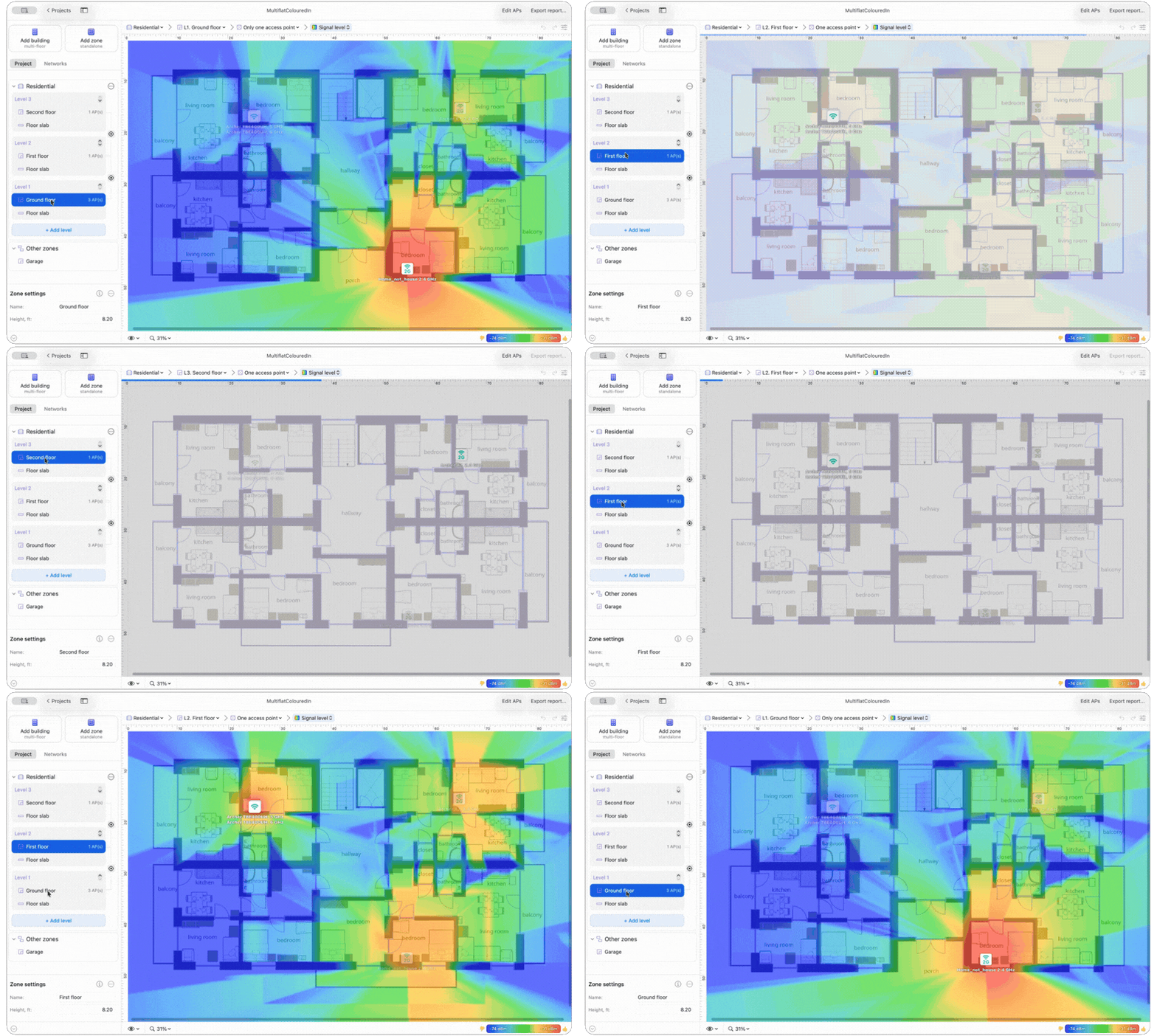
For a multi-floor WiFi design, create a Multi-floor building and add each floor as a separate level. Upload or create the corresponding floor plan for each level so NetSpot can model signal propagation throughout the building accurately.
NetSpot offers two approaches to WiFi planning: Predictive Surveys and Single Hotspot Surveys. These methods provide a comprehensive, data-driven foundation for your wireless network planning, ensuring optimal placement of single or multiple hotspots.
Predictive survey allows you to accurately simulate your wireless network environment without physically setting up any hardware, significantly streamlining the WiFi planning process.
When creating a new project in Planning mode, you can choose between a Single Zone and a Multi-floor building. A Single-level layout is intended for a single area or floor, while a Multi-floor building is intended for a building with multiple levels and allows you to model WiFi propagation between them.
To start your predictive site survey using NetSpot, simply follow these steps:
Step 1
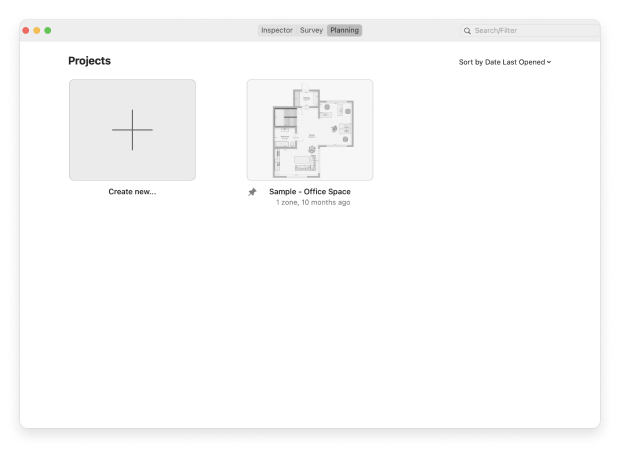
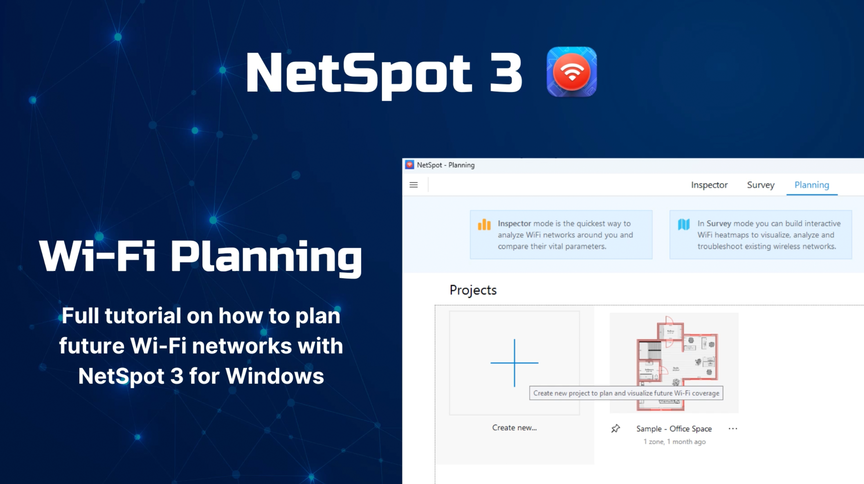
Launch the latest version of NetSpot and activate Planning mode. Create a new project and give it a descriptive name and add a description if needed.
Step 2
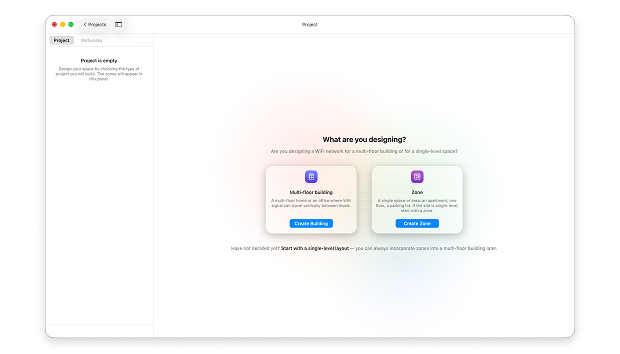
Depending on the project, choose a multi-story building or start with one zone for a single-level space. If you choose a Single Zone, skip Step 6.
Step 3
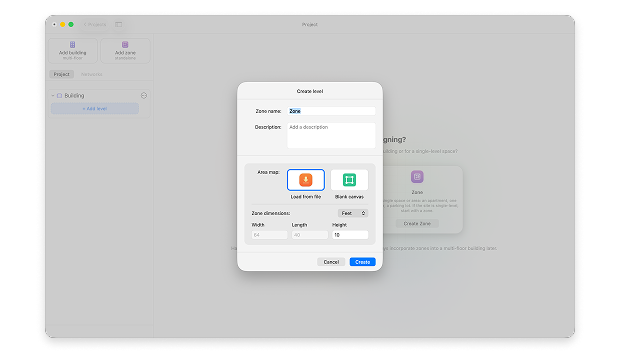
If you choose a multi-floor building, give it a name and add a description, which can be useful during further work. Then click Add Level to start working with the floor plan (the same process applies to Single Zone projects). Upload the floor plan for the level or create a blank canvas, and enter its dimensions, including the height.
Step 4
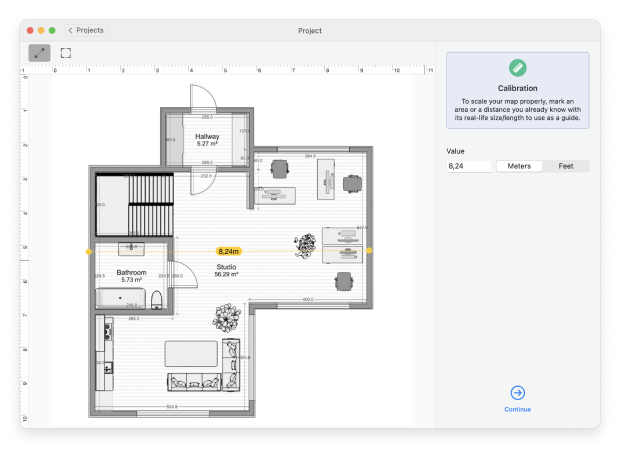
Calibrate the map by marking a known distance or area on the map layout, entering its real-life size or length.
Step 5
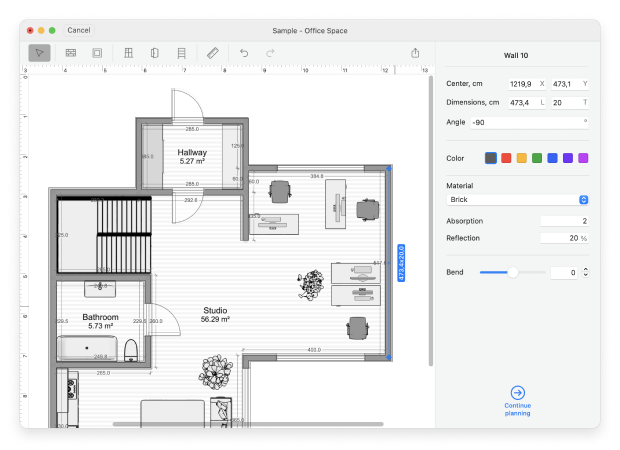
Add walls, windows, and doors, so that NetSpot has plenty of information to accurately simulate how different building materials will impact your WiFi signal. This is crucial for generating a reliable wireless network plan.
Tip: While detailed floor plans help, there’s no need to include every piece of furniture. Focus on walls, doors, and structural elements that impact signal propagation.
Step 6
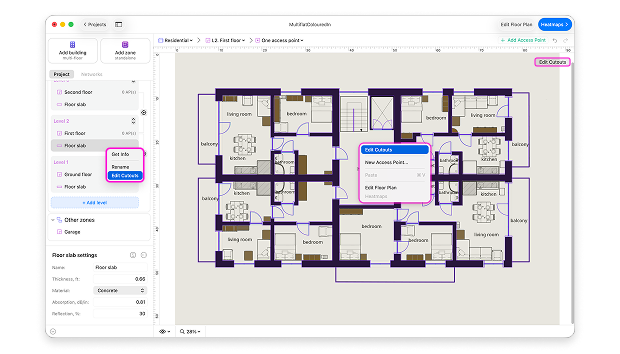
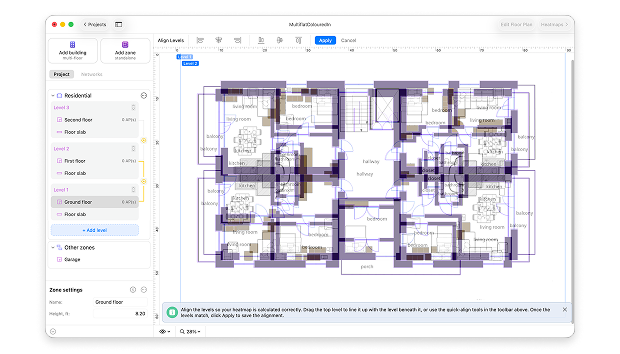
For a multi-story building, specify the floor slab parameters, including its thickness and material. Select the appropriate options from the list or enter custom parameters if necessary.
Then click Edit Cutouts and draw the openings for areas where the floor slab is absent.
Add the remaining floors in the same way, then align the levels so NetSpot can accurately model signal propagation between them.
Step 7
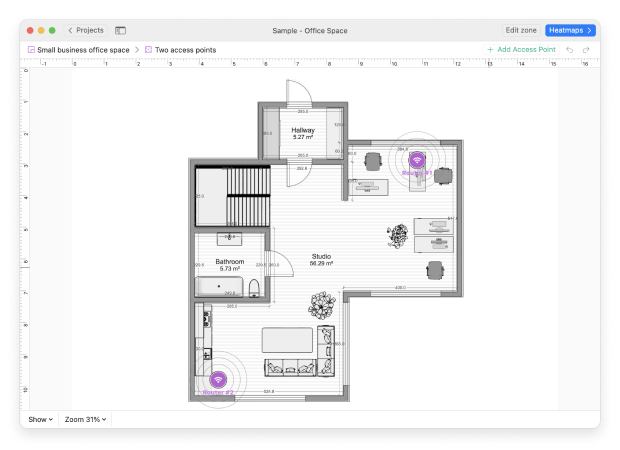
Add the virtual access points onto your calibrated map. If the AP you need appears in the list, simply select it; if not, just enter its specifications manually. Place the APs where needed, specify their mounting height, and adjust their settings and antenna properties, including the antenna orientation and tilt where applicable.
Step 8
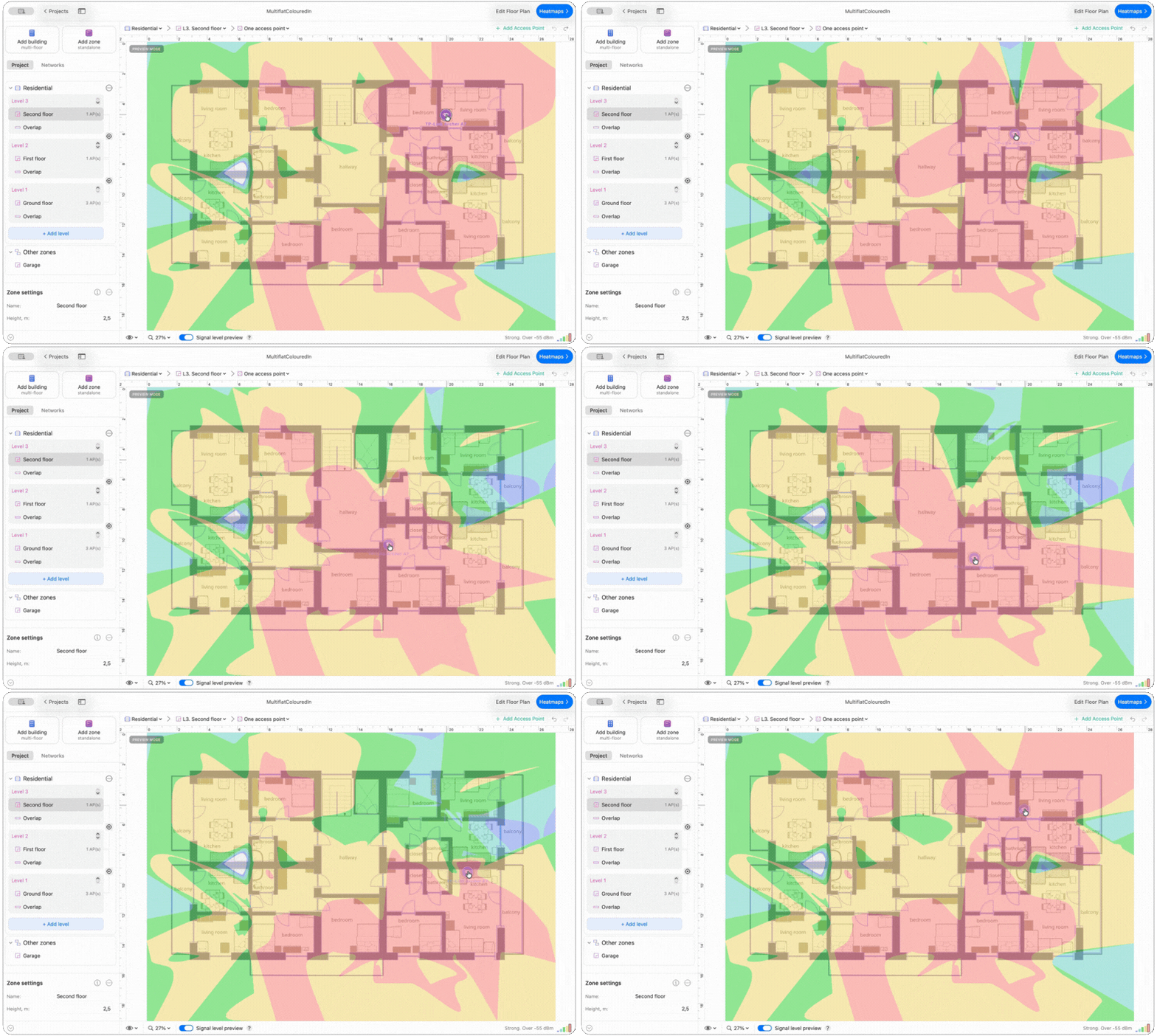
You can preview the predicted signal distribution in real time, even before generating heatmaps — including how the signal propagates between levels in a multi-floor building. As you move the APs, the predicted coverage updates instantly.
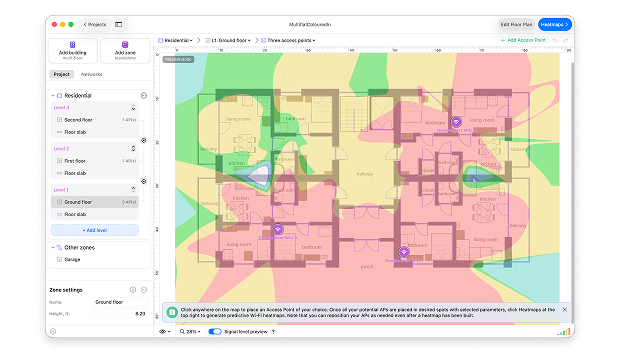
Step 10
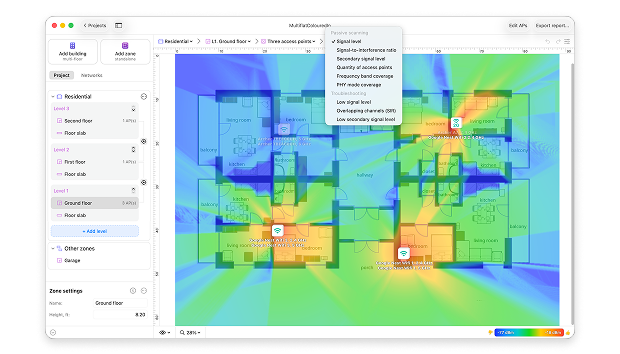
Analyze the generated heatmaps to decide if the virtual routers are placed correctly.
If needed, adjust the positions of your virtual access points — simply drag the access points on the map to see what position gives you better coverage.
Tip: After completing an off-site predictive design, conduct pre-deployment and post-deployment site surveys with NetSpot to ensure your network meets real-world performance expectations.
Plan Future Wireless Networks with a Single Hotspot
If you’ve been planning Wi-Fi networks for a while, you probably already have a feel for where access points should go. That intuition works fine in small spaces, but once you’re dealing with large, multi-floor environments, rough guesses aren’t enough — you need actual measurements and calculations.
In NetSpot, you start by creating a new project and marking the area you want to survey on the floor plan. Then you place a temporary access point at your first chosen spot and collect multiple samples there to get an initial view of how the signal behaves in that part of the building.
After that, you physically move the same AP to another location within the survey area and repeat the process. Each placement gives you a separate snapshot that covers a different portion of the future network.
Once you’ve walked the whole space and gathered snapshots from all those positions, NetSpot lets you combine them into a single, unified survey. The result looks as if you had several access points running at the same time from day one.
This combined survey reflects the real RF environment: nearby Wi-Fi networks, adjacent- and co-channel interference, and even non-Wi-Fi sources of electromagnetic noise that can drag down the Signal-to-Noise Ratio (SNR) for clients on your wireless network.
Power Up
Now that you know how many WLAN access points your network will need, decide on the power requirements to support these points, typically 15 watts or less. Depending on the size of a business, the requirements will differ. Consider the power injectors option — they can be placed anywhere along the line within around 300 feet and will spare you the need for an external AC adapter.
WiFi Network Security and Safety
When a Wi-Fi network isn’t properly locked down, it’s basically an open door: anyone nearby can hop on and do whatever they want with your connection. For a home user that’s already unpleasant, but for a business it can turn into a serious security problem — from data leaks to someone abusing your network for shady activity. That’s why it’s worth taking Wi-Fi security settings as seriously as you do your firewall or passwords.
There are several Wi-Fi security standards, but they’re not all on the same level. Old options like WEP (Wired Equivalent Privacy) should be treated as completely off-limits — they’ve been broken for years and can be cracked in minutes with freely available tools.
WPA and WPA2 are a big step up, using much stronger encryption such as AES instead of the weak ciphers in WEP. The current generation is Wi-Fi Protected Access 3 (WPA3). It improves the handshake process, adds per-user data encryption, and makes password-based access harder to brute-force. Whenever your hardware supports it, turning on WPA3 is the safest choice and the one you should aim for going forward.
Conduct site surveys before and after deployment
Note that a predictive survey won't count the neighboring WLANs co-channel interference, and the existence of electromagnetic signals from neighboring non-WiFi devices. To know more about these RF signals, a wireless site survey is to be done.
The real-time site survey will show you how accurate your predictive survey was within the architectural and RF environments. With all this data combined, you have all the information to design a better WiFi network that will meet and exceed expectations. If you're looking for specialized tools to facilitate this process, check out our list of the top WiFi site survey software currently available.
Keep the following tips in mind when performing a site survey:
- It would be ideal if a client was able to detect a signal of -70 dBm or better from one access point and another signal of -75 dBm or better from one or more other points. A client will firstly connect to an access point with a stronger signal and as it moves closer to a different AP and the signal there grows stronger the client can switch to the new AP. In case there are too many access points with equally strong signals then you can consider thinning them out or lower their Tx power.
With all the data you collected and analyzed you have enough means for designing the wireless network.
Common Wireless Networking Missteps
Ready to go online? Learn how to avoid some of the common wireless network perils:
This Access Point Worked at Home
Some wireless devices designed for home use may not be suitable for business environment, especially if the business is large. Home access points may cost cheaper but they were not made for a space bigger than a small home office and are usually meant for single deployments.
Stay on Point
Once you set everything up it is easy to become unconcerned. However you should keep in mind that technologies evolve quickly as well as hackers' possibilities. Keep your small business safe and unexposed to security risks, keep up with what's going on with the wireless market and where the technology is headed. Staying ahead of any possible risks will save time and money.
Leave Room to Grow
When you build a WLAN, don't just think about current needs, try to think about the future of your network, and prepare to grow with the technology. An advantage of wireless structures is that they are relatively easy to rearrange. Try to think through the business goals and needs in the future — choose the equipment and configuration accordingly.
A wireless network is no doubt an important asset to any business, but as with everything else you should always consider the objectives, limitations, the potential benefits as well as possible problems. Being aware of both advantages and disadvantages will keep the efficiency on the higher level and will make your wireless network a valuable asset to a successful business plan.
Conclusion
Planning a wireless network is an important task that can greatly influence your overall online experience. While this task might seem difficult, utilizing specialized Wi-Fi planning software like NetSpot can simplify the process. With NetSpot, you can effectively map out your coverage area, estimate the optimal number of access points, and identify potential issues in your wireless network plan before they become actual problems.
SO, WE RECOMMEND

NetSpot
Wi-Fi Site Surveys, Analysis, Troubleshooting runs on a MacBook (macOS 11+) or any laptop (Windows 7/8/10/11) with a standard 802.11be/ax/ac/n/g/a/b wireless network adapter. Read more about the 802.11be support here.
WiFi Planning — FAQ
What is Wi-Fi planning?
The term Wi-Fi planning refers to the process of designing and configuring a wireless network to meet specific coverage, capacity, and performance goals. Typically, Wi-Fi planning is aided by specialized tools like NetSpot, which simplify the complex task of wireless network planning.
What are the types of network planning?
Network planning can be broadly divided into the following sub-types:
- Predictive network planning: Involves using software tools to create a virtual model of the intended network environment.
- Post-deployment survey: Conducted after the network has been set up, this survey verifies if the network meets the initial design specifications and goals.
- Real-time network monitoring: The ongoing analysis of an active network to ensure its optimal operation.
How do I plan my Wi-Fi coverage?
To plan your Wi-Fi coverage, you can start by performing a predictive site survey to simulate how your wireless network will behave in a specific environment. This involves creating a virtual layout of the area where you intend to deploy the network, marking potential access point locations, and setting performance goals.
How to plan a WiFi deployment?
Estimate how many clients are going to connect to the deployed network, how much traffic is it going to need, and size up your space to see how many access points you might be installing.
How to Perform a Predictive Site Survey?
To perform a WiFi site survey, use a WiFi planner tool like NetSpot. It can help you estimate the optimal amount of access points and will map out their efficient placement. The visual map is very helpful as you'll be able to drag the access points and see how their positions affect your wireless coverage.
How to Perform a manual Site Survey?
A manual site survey benefits you in many ways: with the data collected you can easily create a better wireless network that will meet and exceed the expectations. When performing a manual site survey, keep the following in mind:
- For data services, the wireless devices on the network should have a minimum RSSI of -70 dBm and an SNR of at least 20 dB. For voice and video connection, aim for RSSI of at least -67dBm and SNR of at least 23 dB.
- You want a sufficient amount of access points in your network with strong signal. You don't need to overcrowd your space with APs however. An optimal AP placement will help you save money and build an even coverage.
What are the Common Wireless Networking Missteps?
- Using an access point not suitable for a specific environment. What works well for a private home network, might fail in a large business environment.
- Placing access points without any strategy. Perform a WiFi survey with NetSpot to determine optimal placement and number of devices.
- Not staying in the know. It is not just setting up the network that keeps it functioning well, it is also proper maintenance. Keep your business safe and unexposed to security risks, keep up with what's going on with the wireless market and where the technology is headed. Staying ahead of any possible risks will save time and money.
- Not thinking ahead. Don't just think about your immediate needs when setting up a network, try to think how it will develop and what your business might need from it in the future.

Get NetSpot for Free
Wi-Fi Site Surveys, Analysis, Troubleshooting runs on a MacBook (macOS 11+) or any laptop (Windows 7/8/10/11) with a standard 802.11be/ax/ac/n/g/a/b wireless network adapter. Read more about the 802.11be support here.