WiFi Planning Tool runs on a MacBook (macOS 11+) or any laptop (Windows 7/8/10/11) with a standard 802.11a/b/g/n/ac/ax/be wireless network adapter.
Best Wi-Fi Planning Tools
Looking for the right Wi-Fi planning software? Explore the top tools with predictive survey capabilities to optimize coverage, reduce interference, and avoid dead zones.
Planning a wireless network before deployment is essential if you want stable performance and full coverage without unexpected dead zones. Wi-Fi network design has become a technical field in its own right, requiring a solid understanding of signal behavior, interference, and hardware capabilities.
That’s why WiFi planning tools have become an important part of both professional and DIY network projects. Whether you're building a new network from scratch or improving an existing one, using the right WiFi planning software helps you avoid costly mistakes and ensures your network performs as expected.
Jump to...
What a Wi-Fi planning tool does for you
Before we get into the tools themselves, let’s take a minute to understand why WiFi planning software is so important — and what it actually helps you solve. Whether you’re rolling out a massive enterprise network or just want rock-solid coverage in your new office, a good WiFi planner takes the guesswork out of the process.
Good WiFi network planning helps you address three key issues in advance:
- Is there enough coverage for every corner of the building?
- Will the network be able to handle the maximum influx of users?
- Will walls, equipment, or other people's routers block the signal?
Answers to these questions allow you to accurately determine the number of access points, select the best locations, and configure channels and equipment. This eliminates guesswork, saves time, and ensures a stable connection in the future.
There are many wireless network design programs available. Below, we'll review four popular utilities and explain why NetSpot is the best choice.
| NetSpot | |
| Functionality | 🟢 Wide |
| Ease of Use | 🟢 Extremely intuitive (great for beginners & pros) |
| Multiplatform Support | 🟢 Windows, macOS, Android |
| Wi-Fi 6/7 Support | 🟢 Yes (Wi-Fi 6 & 7) |
| Subscription Required | 🔴 No |
| Ekahau AI Pro | |
| Functionality | 🟢 Wide |
| Ease of Use | 🔴 Complex, certification recommended |
| Multiplatform Support | 🟢 Windows, macOS |
| Wi-Fi 6/7 Support | 🟢 Yes (Wi-Fi 6 & 7) |
| Subscription Required | 🟢 Yes |
| Acrylic WiFi Heatmaps | |
| Functionality | 🟡 Medium |
| Ease of Use | 🟢 Moderate learning curve |
| Multiplatform Support | 🔴 Windows only |
| Wi-Fi 6/7 Support | 🟢 Yes (Wi-Fi 7) |
| Subscription Required | 🟡 Partially (advanced features) |
| Cambium Wi-Fi Designer | |
| Functionality | 🔴 Limited |
| Ease of Use | 🟢 Web-based, beginner-friendly |
| Multiplatform Support | 🟢 All OS via browser |
| Wi-Fi 6/7 Support | 🔴 No explicit Wi-Fi 6/7 support |
| Subscription Required | 🔴 No (Free) |
Choice #1
NetSpot’s Planning Mode acts as a virtual design tool, simulating Wi-Fi coverage and performance before installation to help you place access points with precision.
-

Inspector Mode
Gives you real-time insights into the WiFi networks around you..
-

Survey Mode
Provides a comprehensive, map-based analysis of your WiFi network's performance.
-

Planning Mode
Enables you to simulate and plan your WiFi network's layout and coverage.
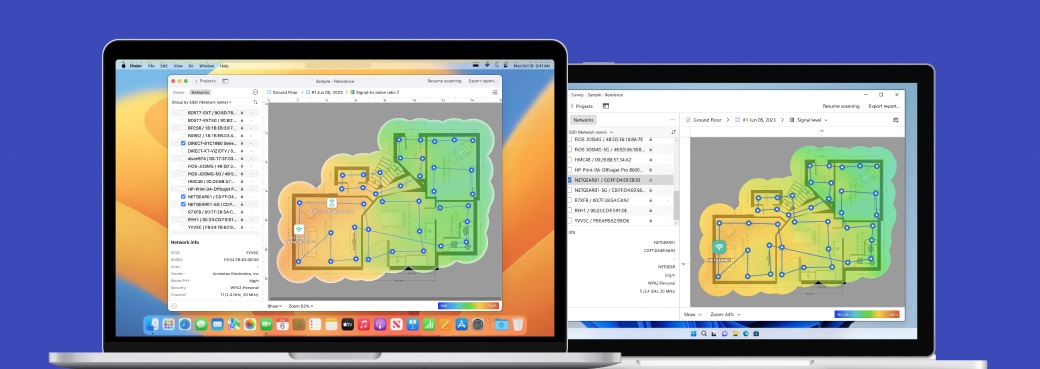
NetSpot delivers a professional-grade WiFi planning tool with a user-friendly design that works for beginners and advanced users alike. Starting with NetSpot 6, create a complete WiFi design for both single-level spaces and multi-floor buildings, making it possible to model WiFi coverage across an entire building rather than treating each floor as an isolated project.
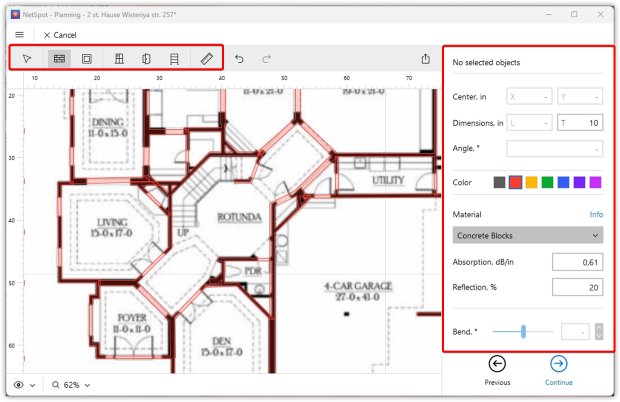
NetSpot includes a convenient floor-plan editor that lets you draw walls, doors, windows, and racks and assign real building materials with specific thickness and signal-loss values. If a material isn’t listed, you can manually enter custom parameters to better match your space and simulate how Wi-Fi signals will behave in real conditions.
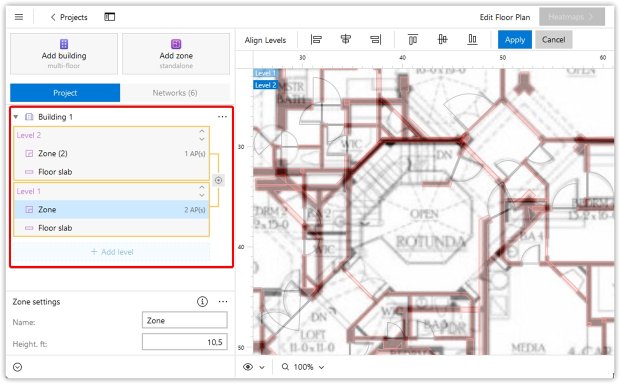
For multi-story buildings, each floor is added separately. Each level is assigned its own dimensions, height, and layout (complete or empty). You can also specify the parameters of the interfloor slabs (material and thickness) and place openings — for example, for stairwells or atriums. Finally, all floors should be aligned so NetSpot can calculate how the wireless signal propagates through ceilings and floors.
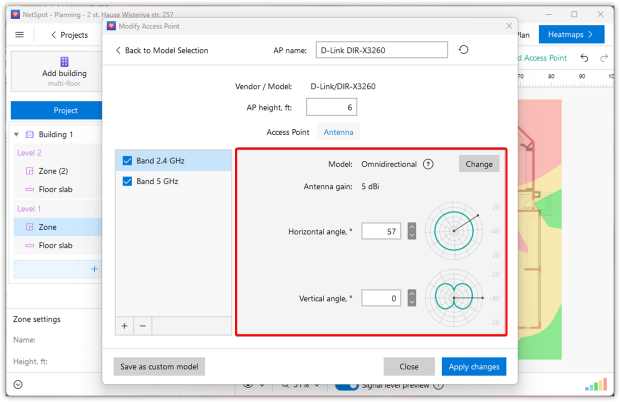
The tool comes with a large library of access points from all major vendors. If your exact model isn’t there, you can define a custom AP by entering transmit power, frequency support, and other specs.
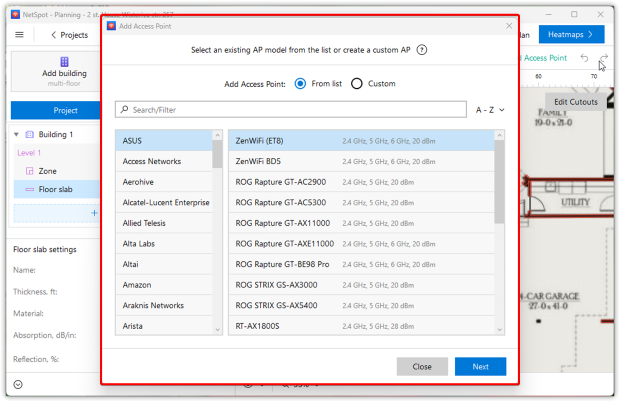
You can also experiment with different antennas — select between omnidirectional or directional models, adjust gain, and even change the tilt angle to simulate real-world installation scenarios.
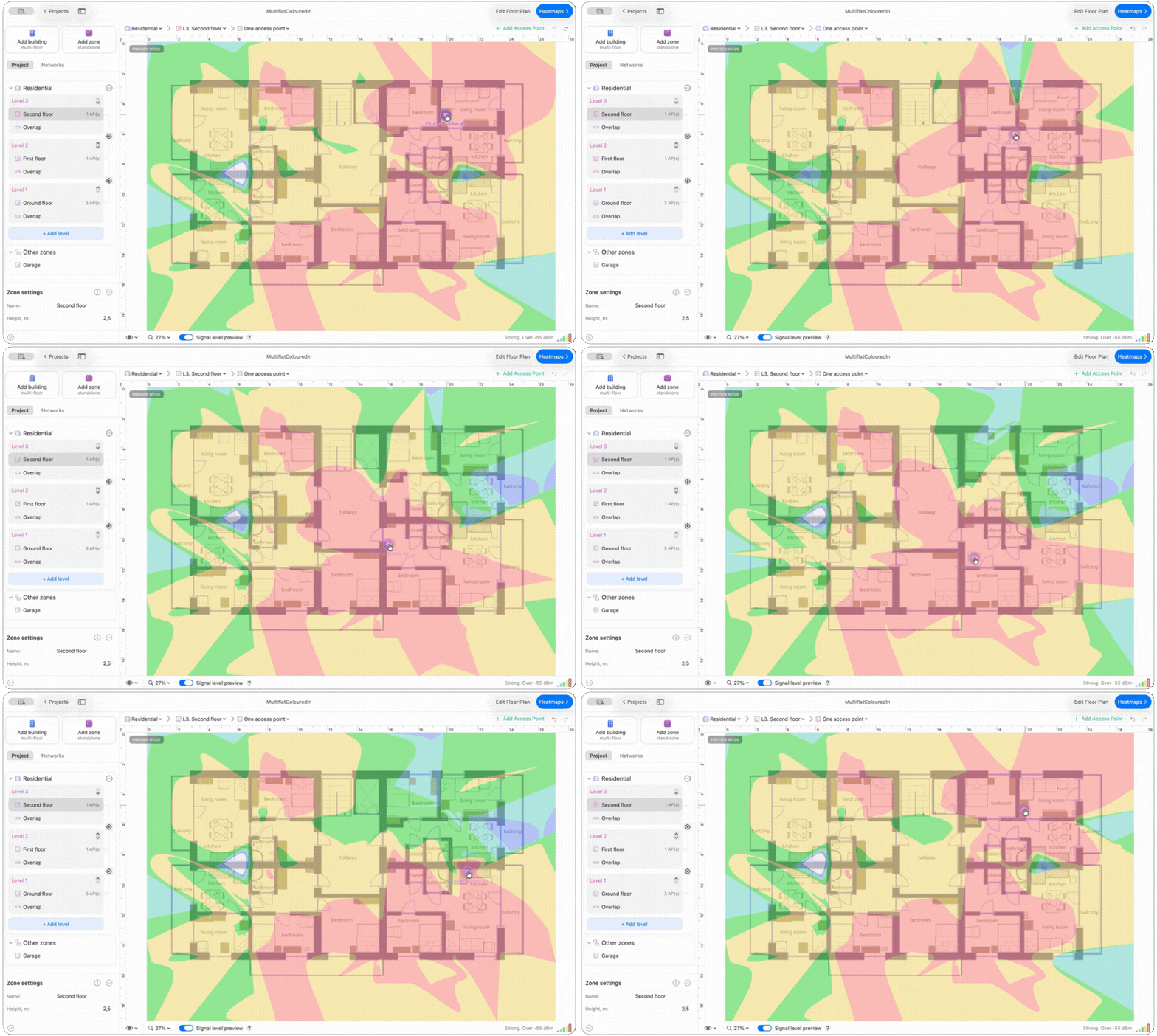
While you’re placing access points, NetSpot updates the predicted signal distribution in real time, before you even generate the Wi-Fi heatmaps. As you drag an AP to a new position, the signal preview updates instantly, so you can see how the change affects coverage.
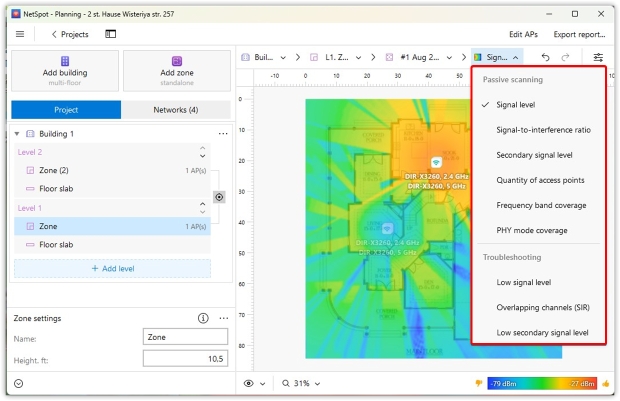
In Planning Mode, NetSpot provides nine focused heatmaps to simulate WiFi behavior before deployment:
- Signal Level
- Signal-to-Interference Ratio
- Secondary Signal Level
- Quantity of Access Points
- Frequency Band Coverage (2.4 GHz, 5 GHz, 6 GHz)
- PHY Mode Coverage (802.11 a/b/g/n/ac/ax/be)
- Low Signal Level Areas
- Overlapping Channels (SIR)
- Low Secondary Signal Level
These heatmaps allow you to drill down into key network parameters, comprehensively assessing coverage quality, connection density, and interference risks. This makes it easier to identify potential coverage and interference problems and adjust AP placement before installing the actual network.
In a multi-floor design, the aligned building model also lets you evaluate how AP placement on one level can affect coverage on the floors above or below it, instead of optimizing every floor completely independently.
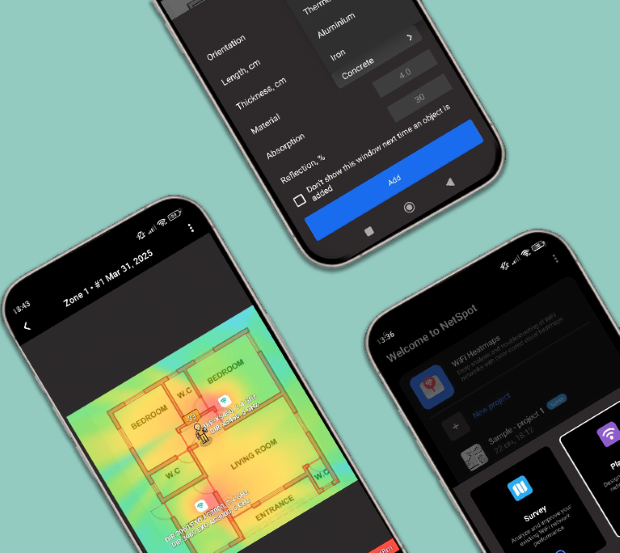
A huge plus is that the planning mode is also available in the Android version of NetSpot. This allows you to create and adjust network diagrams directly on your smartphone or tablet, without even opening your laptop.
In addition to wireless modeling, NetSpot also includes an inspector mode for quickly scanning the radio environment and assessing the situation and performing measurements in real-world conditions on-site and Survey Mode for on-site measurements. Together, these tools provide a complete cycle of Wi-Fi design, verification, and maintenance — from virtual modeling to fine-tuning on-site.
Ideal for:
The program is designed for home users, system administrators, and network engineers who value a balance between powerful functionality and ease of management. Perfect for designing, validating, and troubleshooting Wi-Fi networks across platforms.
The new multi-floor workflow is particularly useful when planning WiFi for offices, schools, hotels, warehouses, and other buildings where coverage has to work across several levels.
Pros and Cons
-
Multi-floor predictive modeling with signal propagation between aligned levels
-
Support for Wi-Fi 6 and Wi-Fi 7
-
Intuitive and easy to use
-
Works on Windows, macOS, and Android
-
No subscription required
-
Includes Planning, Survey, and Inspector modes
-
Custom walls, APs, and antenna settings
-
Accurate simulations
-
Advanced visualizations
-
No automatic AP placement
- Summary recommendation: Get NetSpot
Choice #2

Ekahau AI Pro
Available for Windows 10/11 (64-bit), macOS 11 and later.
Ekahau AI Pro is an advanced Wi-Fi planning and optimization platform built for large-scale enterprise networks. It’s widely recognized as an industry standard among wireless engineers and is typically used in complex environments like hospitals, warehouses, manufacturing sites, and corporate campuses.
It offers a powerful set of tools:
- AI Auto-Planner that automatically places access points based on wall materials, floor height, and coverage requirements
- Automatic Channel Planner for all three bands (2.4, 5, and 6 GHz)
- Network Simulator to test AP models and “rip-and-replace” scenarios before purchasing any gear
- Advanced reflections and diffractions modeling for ultra-precise signal predictions
- Automatic wall calibration using data from the Ekahau Sidekick 2
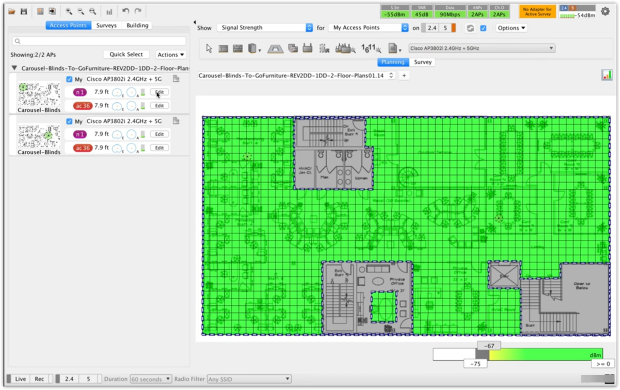
All of this makes Ekahau a powerful, but far from simple solution. The interface is divided into four professional modes — Design, Survey, Inspect, and Live — and the software itself requires not only a deep understanding of Wi-Fi fundamentals, but also proper training. It’s no surprise the company offers a dedicated certification course (ECSE), without which even seasoned professionals may struggle to unlock the tool’s full potential.
Ekahau AI Pro is definitely built for professionals who need precision, scalability, and full control over every detail. But for most users, it might be overkill — both in terms of complexity and cost.
Ideal for:
This software is designed for corporate engineers, trained specialists, and system integrators who design large-scale networks with high user density. The product is ideal for large corporations and teams that value pinpoint accuracy, throughput modeling, and full compatibility with specialized equipment like the Ekahau Sidekick.
Pros and Cons
-
AI-driven design
-
Wi-Fi 7 support
-
Advanced visualizations
-
High price
-
Requires additional hardware (Sidekick 2)
-
Not beginner-friendly, has a steep learning curve
Choice #3

Acrylic WiFi Heatmaps
Available for: Windows Vista, 7, 8, 8.1, 10, and 11.
Acrylic WiFi Heatmaps is a well-known Wi-Fi planning program that, in addition to surveys, also offers a range of features for wireless network design. Windows-based tool, it's suitable for creating predictive coverage maps without delving into complex RF models.
Users can easily upload floor plans, assign wall materials, and test different virtual access point placements to visualize how the signal will propagate indoors under given conditions.
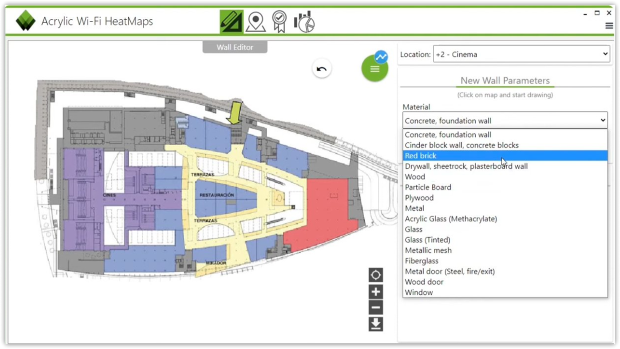
The program also allows you to configure power levels, antenna types, and installation heights for quick design adjustments.
The tool offers a wide range of heatmaps — signal strength, interference, and more.
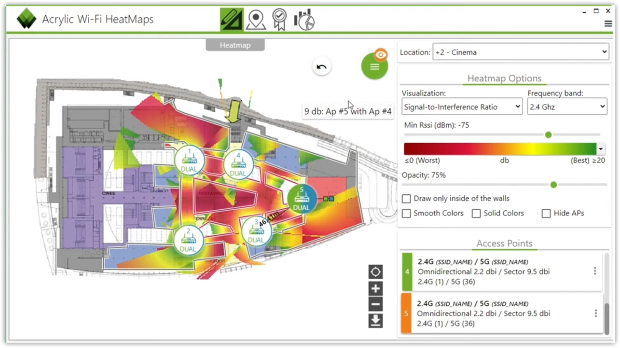
While Acrylic makes Wi-Fi planning accessible, its feature set is more limited compared to high-end tools. Some advanced features, like professional report export and continued updates, are only available with a subscription.
While it offers powerful analysis tools, users have reported that initial setup — especially for GPS tracking and adapter compatibility — can be time-consuming and not always intuitive. The trial version is also fairly limited, so to take full advantage of its capabilities, a paid license is required.
Ideal for:
It’s best suited for smaller-scale deployments where simplicity and speed matter more than deep technical analysis.
Pros and Cons
-
Simple interface
-
Supports Wi-Fi 7
-
Affordable and easy to get started
-
Windows-only
-
Complicated setup for some features
-
Lacks advanced modeling features (capacity, throughput)
-
Some features require a paid subscription
Choice #4

Cambium Wi-Fi Designer
Available for: Browser-based (all major OSs).
Cambium Wi-Fi Designer is a free cloud-based planning tool built around Cambium access points. It works directly in the browser, so there’s nothing to install, and it can be used from almost any device or operating system. Users can upload an existing floor plan or draw one from scratch, add wall materials, and model coverage using Cambium’s e-series AP catalog.
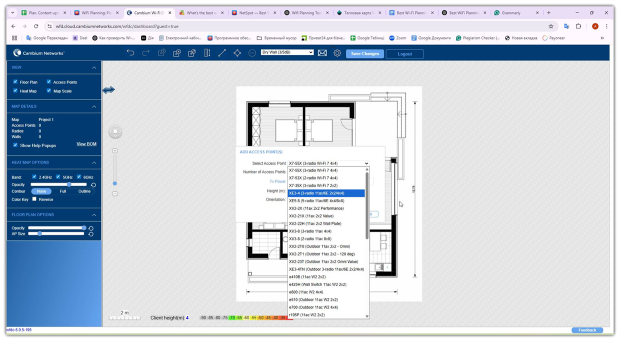
The tool instantly takes care of routine tasks: it automatically generates heat maps and generates equipment specifications. For system integrators, this is a ready-made solution for quickly estimating point locations and calculating the project budget without unnecessary delays.
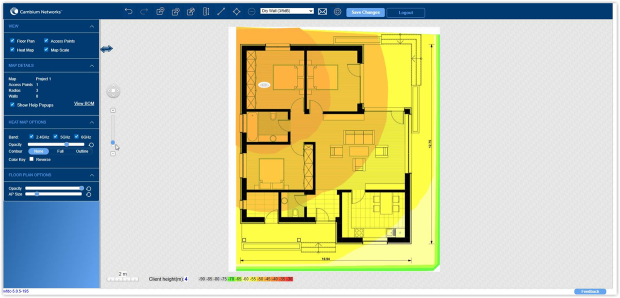
The web version eliminates installation altogether — the software runs directly in the browser, so you can design a network on any laptop or tablet, regardless of operating system. The interface itself is extremely clean and intuitive: you won't have to spend hours figuring it out, even if this is your first project.
However, Cambium Wi-Fi Designer has strict limitations. The program is tightly tied to the native Cambium hardware, so you can't build a hybrid network using equipment from different brands. Furthermore, it lacks complex functionality: the planner can't calculate network capacity under load, analyze radio interference, or predict access point behavior under a surge of users. It's a lightweight tool for basic calculations.
Ideal for:
Specialists who work exclusively with Cambium hardware and are looking for a lightweight web tool to quickly sketch out a coverage map and export specifications. It's ideal for small projects or the pre-sale stage, when simplicity and speed are paramount.
Pros and Cons
-
Completely free to use
-
No installation required — works in any modern browser
-
Generates heatmaps and equipment lists for Cambium networks
-
Only supports Cambium hardware
-
No capacity or interference modeling
-
Lacks spectrum analysis or survey features
-
Limited flexibility for large or complex projects
Final Verdict
Each of the planners reviewed has its own advantages and target audience. It's simply necessary to consider your needs and capabilities. However, if you need software that combines high precision, a user-friendly interface, and flexibility across multiple platforms, NetSpot clearly excels.
The developers have managed to package professional design tools into a framework that's easy to use, with a low learning curve and no need for powerful hardware.
SO, WE RECOMMEND

NetSpot
Wi-Fi Site Surveys, Analysis, Troubleshooting runs on a MacBook (macOS 11+) or any laptop (Windows 7/8/10/11) with a standard 802.11be/ax/ac/n/g/a/b wireless network adapter.
FAQs: Best WiFi Planning Software
What is the best WiFi planning software for home use?
For home users, a balance between accuracy and simplicity is important. That's why NetSpot is often considered the best option. It combines predictive surveys, heat maps, and intuitive controls — no special equipment or training required.
Wi-Fi simulation lets you test coverage, signal strength, and interference before installing any hardware. This helps avoid dead zones, poor performance, and overbuying access points — saving time and money during deployment.
Do I need predictive surveys for my WiFi network?
If you need to deploy a new network or want to make changes to an existing one, preliminary surveys are highly recommended. They allow you to simulate Wi-Fi behavior based on real-world data, wall materials, and access point characteristics, giving you a clear understanding of coverage and potential interference before deployment.
What’s the easiest WiFi planning tool for beginners?
For a beginner, NetSpot is a good choice. It features a clear interface and intuitive step-by-step process. It's ideal for beginners, yet powerful enough for IT administrators and wireless network specialists.
Does NetSpot support WiFi 6E and WiFi 7?
Yes, NetSpot’s Planning mode fully supports Wi-Fi 6E and Wi-Fi 7, including network modeling in the 6 GHz band. This allows you to design next-generation wireless networks with a headroom for years to come.
Yes, NetSpot offers a dedicated Android app with full Planning Mode support. It lets you simulate coverage, draw floor plans, and model access point placement directly from your phone or tablet.

Get NetSpot for Free
Wi-Fi Site Surveys, Analysis, Troubleshooting runs on a MacBook (macOS 11+) or any laptop (Windows 7/8/10/11) with a standard 802.11be/ax/ac/n/g/a/b wireless network adapter.