Wi-Fi Site Surveys, Analysis, Troubleshooting runs on a MacBook (macOS 11+) or any laptop (Windows 7/8/10/11) with a standard 802.11be/ax/ac/n/g/a/b wireless network adapter. Read more about the 802.11be support here.
WiFi Network Design
Learn how WiFi network design really works: what affects coverage and capacity, why layouts and building materials matter, and how to avoid costly rework after deployment with the help of the right WiFi design software.
At first glance, designing a WiFi network seems straightforward. Simply install access points, turn on the equipment, and you have a functioning network. However, in practice, it quickly becomes clear that without a well-thought-out WiFi network design, a wireless network can create more problems than it solves. This is why proper WiFi design is now considered not a formality, but a mandatory step in deploying any modern network.
Jump to...
How the WiFi Network Design Process Is Built
Define requirements and goals
The first important step is to start by defining requirements. In practice, this means not an abstract "we need good WiFi", but very specific actions: count the number of users during peak hours, estimate the average number of devices per person (laptop, smartphone, tablet), determine the type of traffic — video calls, streaming, work with cloud services, or regular web access.
In offices and educational institutions, it often makes sense to run a short survey or interview with key users and the IT department to understand real load scenarios, rather than relying on formal numbers.
This approach immediately helps determine where you need performance and capacity headroom, and where stable coverage is enough. Practice shows that working through usage scenarios removes a significant share of future problems even before design begins.
Determine the site type by purpose
The next stage is defining what kind of space you’re designing for, because there is no universal WiFi design: solutions that work in one type of site can turn out to be ineffective in another. For offices, the key factors are stability and correct roaming. In classrooms, connection density comes first. And hotel WiFi design forms a separate category of tasks altogether: thick walls between rooms, long corridors, public areas, and a constantly changing user base.
Capture the building’s physical constraints (dimensions, materials, obstacles)
This step is hugely important — and in practice, it’s one of the biggest “make it or break it” factors in WiFi design. The building’s physical constraints aren’t just background details. Wall thickness, construction materials, ceiling height, elevator shafts, metal structures, utility rooms — all of that directly affects the physical way a WiFi signal spreads, attenuates, reflects, and gets blocked.
If you ignore this part (or treat it as “we’ll fix it later”), you usually end up with a design that looks fine on paper but falls apart in the real world.
To work through this properly, it helps to use predictive design tools that let you model coverage in advance — not in an abstract “ideal” building, but in your building, with its real layout and materials. In practice, you upload a floor plan, calibrate it to scale, assign wall/floor materials, and then simulate access point placement to see how the signal is likely to propagate and where weak zones will appear before you buy hardware or start drilling into walls.
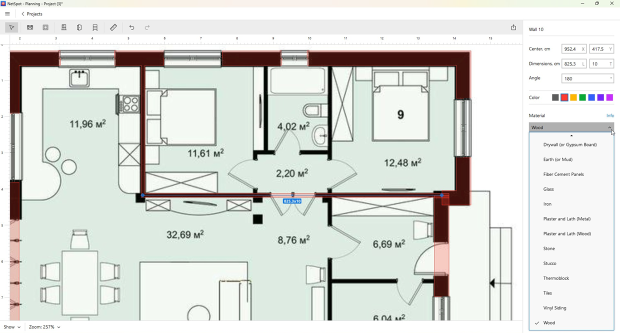
Select equipment and plan the configuration
Only after these steps does it make sense to move on to access point placement. And this is also the point where you can switch from "coverage thinking" to actual wireless design and hardware selection: not only access points, but the whole stack around them.
Depending on the site, this may include the router/gateway, switches (often PoE), the controller or cloud management, and even the cabling plan and uplink capacity — because WiFi performance collapses quickly if the wired side is undersized. This is where WiFi design tools become especially practical: you can pick specific AP models from a library.
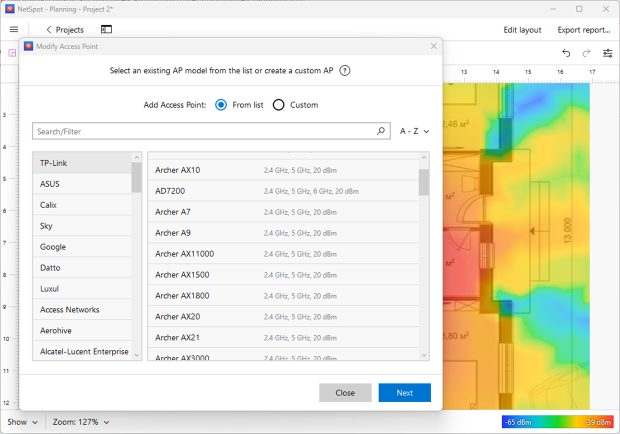
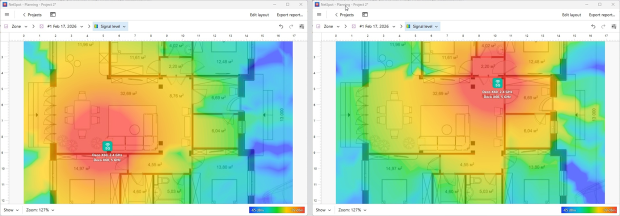
"Try" different placements on the floor plan, and compare what changes.
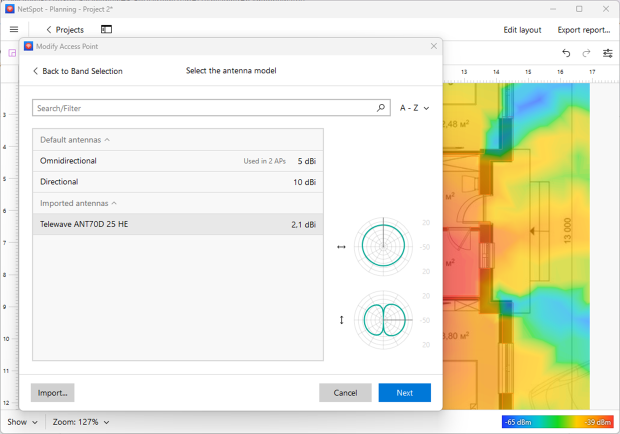
In more advanced scenarios, you can even select the antenna type/model and set antenna orientation/tilt, so you’re not guessing — you’re validating the design before you buy hardware or start drilling holes.
Placing access points “by eye” almost always leads to overlaps, overload of certain zones, and unstable network operation. It’s much more effective to account in advance for high-load zones, potential sources of interference, and the necessary signal overlap.
Practice shows that projects done with the minimum acceptable number of access points most often run into overload after launch. That’s why building in a reasonable buffer for coverage and capacity usually pays off far more than fixing things later.
That’s exactly why it’s better to treat WiFi deployment as an important process, not an extra procedure — because fixing overload and coverage gaps after launch almost always costs more than building in a reasonable buffer from the start.
How WiFi Design Software Is Selected
When choosing WiFi design software, the main goal is to find a tool that actually helps with network planning rather than making the process more complicated. The choice of tool directly affects how predictable and manageable the entire WiFi deployment process will be.
A practical and well-structured solution makes it possible to work accurately with floor plans, test placement decisions in advance, and identify potential coverage or capacity issues before installation begins. There are several types of solutions available, and each one fits different use cases.
One of the widely used options is NetSpot. It allows you to upload a floor plan, place access points, and see a visual prediction of coverage. In a typical workflow, the first step is to create a project and upload the floor plan. Then the plan must be calibrated to match real-world dimensions.
After that, wall and floor materials are defined, since these directly affect signal propagation and coverage accuracy. Once these steps are completed, access points can be placed and adjusted, making it possible to evaluate overlap, dead zones, and potential overload areas before any hardware is installed.
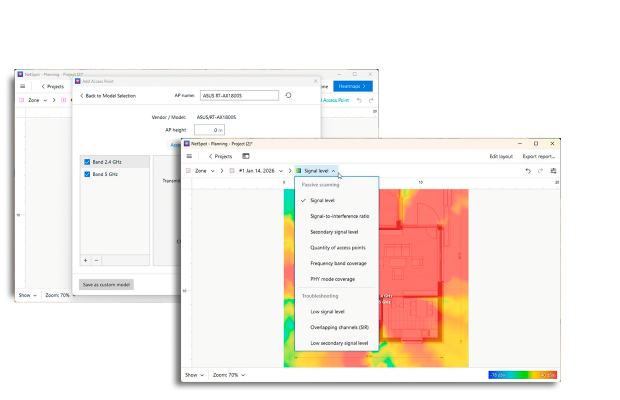
NetSpot isn’t built for highly specialized enterprise-only scenarios or extremely complex environments, but for most real-world deployments — offices, schools, hotels — it provides everything needed. Behind its simple interface, NetSpot is a powerful WiFi design tool that helps you make informed decisions before installation even begins.
Another well-known option is Ekahau. It belongs to a higher class of professional tools and is often used in large enterprise deployments. It offers very precise modeling and detailed analysis, but this comes at a cost — both financially and in terms of the time required to learn and use it effectively.
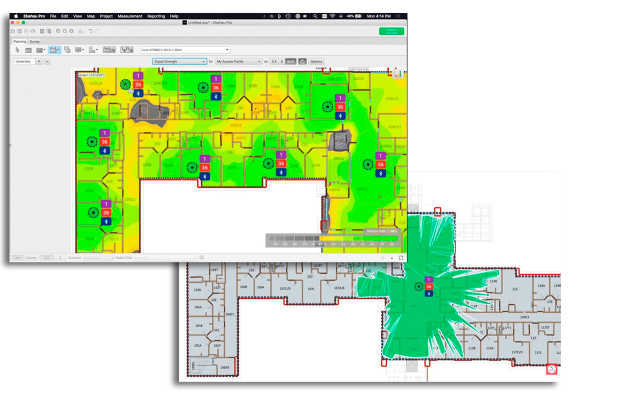
For large-scale projects, Ekahau can be justified, but for more typical environments, it may be more than necessary.
AirMagnet Survey is commonly used for troubleshooting and auditing existing wireless networks. Its analysis capabilities are strong, but as a primary tool for initial WiFi design, it’s less practical. The planning process is less visual and can be harder to use as part of a regular design workflow.
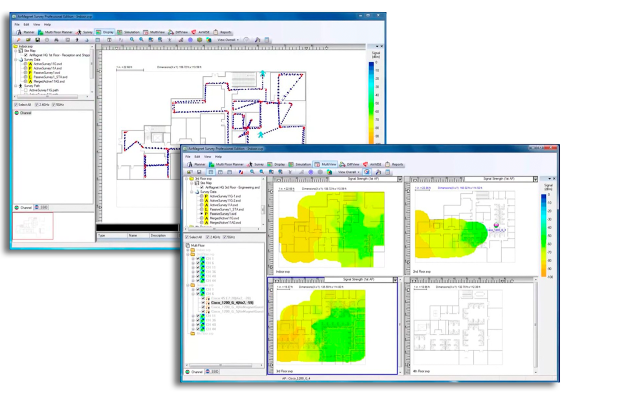
In practice, most deployments benefit from finding the right balance between usability and capability. Tools like NetSpot don’t promise unrealistic results, but they make it possible to design a WiFi network in a clear and structured way, validate decisions, and make adjustments before installation.
Conclusion
WiFi network design is not a one-time activity, but a skill developed through practice and error analysis. Clearly formulating requirements, properly working with floor plans, and using modeling tools allow you to move from intuitive solutions to systemic WiFi network design. This approach is becoming the foundation of reliable and stable wireless networks today.
SO, WE RECOMMEND

NetSpot
WiFi Network Design FAQ
What is predictive WiFi design, and when do I need it?
Predictive WiFi design is modeling coverage before you install anything. You upload a floor plan, calibrate it, assign wall/floor materials, and simulate AP placement to spot weak zones early. It’s especially useful in new builds, renovations, hotels, multi-floor sites, and any project where "trial and error" would be expensive.
What is the best WiFi design software for a typical deployment?
For most real-world environments (offices, schools, hotels), a tool that supports floor plans, calibration, material settings, and predictive coverage is the practical choice. High-end platforms can be worth it for large enterprise projects, but many teams prefer a simpler workflow that still allows accurate planning and validation.
What are the main steps in the WiFi network design process?
Define requirements and goals, identify the site type (office/classrooms/hotel), capture physical constraints (dimensions, materials, obstacles), then select equipment and plan configuration. In practice, that sequence prevents the classic mistake: buying hardware first and “discovering” the real problem after installation.
How many access points do I need for good WiFi coverage and capacity?
There’s no universal number. A design that barely meets minimum coverage often fails under real load, especially once the network is busy. It’s usually smarter to build a small buffer for both coverage and capacity than to run "just enough APs" and pay for rework later.
What’s the difference between WiFi coverage and WiFi capacity?
The coverage is "can I connect and keep a stable signal here?". Capacity is "can the network handle the number of clients and the type of traffic here?". Many deployments look fine on coverage maps but still feel slow because the design didn’t plan for density, airtime competition, and high-load zones.
How do I know if my WiFi design will work before I install hardware?
Use a predictive model that matches your real layout and materials, test multiple placements, and check for dead zones, over-coverage, and high-load areas that might overload. The goal is to validate decisions early, when moving an AP on a screen is free — moving it after installation isn’t.

Get NetSpot for Free
Wi-Fi Site Surveys, Analysis, Troubleshooting runs on a MacBook (macOS 11+) or any laptop (Windows 7/8/10/11) with a standard 802.11be/ax/ac/n/g/a/b wireless network adapter. Read more about the 802.11be support here.