When you begin creating a new survey, you’ll need to upload your map/floor plan or sketch it, then you’ll be asked to set the data point precision. The precision of data points on your survey directly depends on the size of the surveyed area.
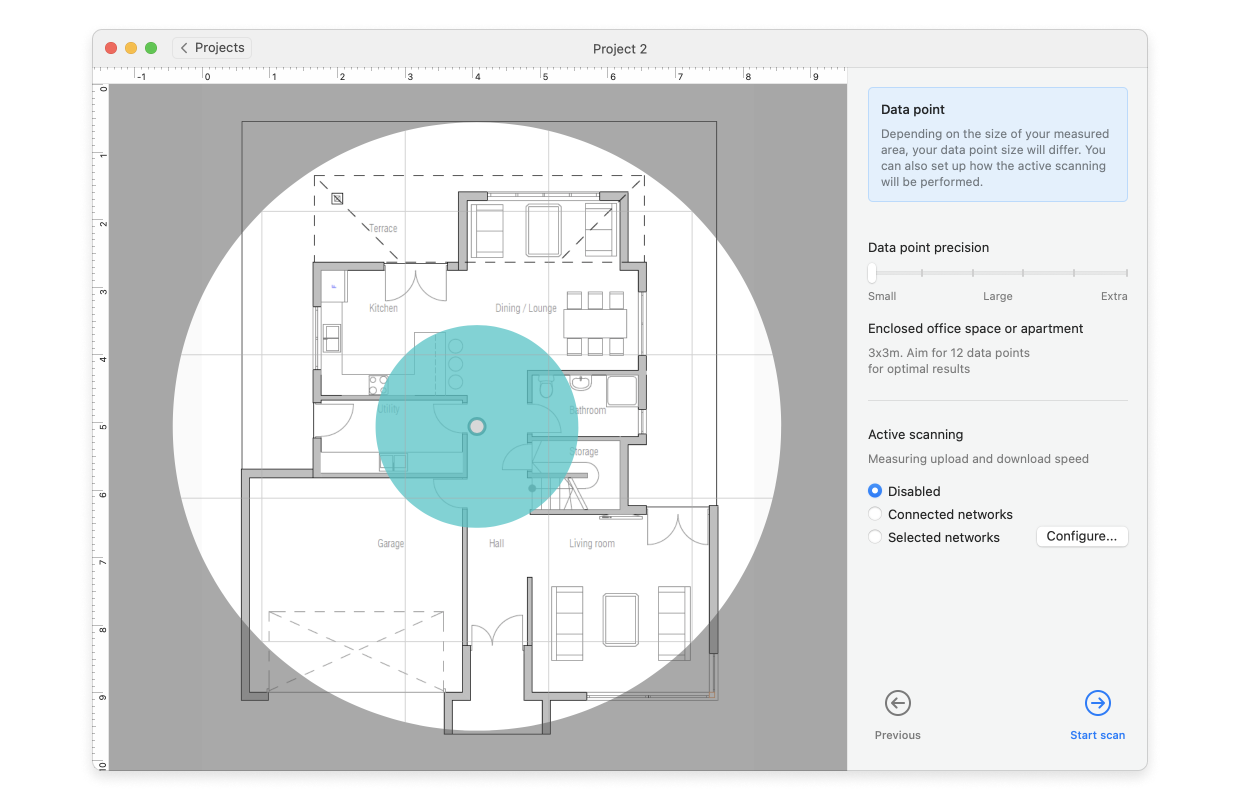
Throughout the duration of your survey you’ll be taking measurements in different data points and depending on the size of your area/precision, the size of a blue circle surrounding each data point will differ. The larger and more unobstructed the area, the larger circles can be. This also affects how many measurements you’ll take in total. If you have a furnished tight office space, the data point precision should be sharper (small area), if it is a stadium with no obstructions, you can go Extra on the settings slider.
Note: The Survey functionality is available only in paid versions of NetSpot (PRO, and Enterprise). If you have the free version, you won’t be able to access the data point precision settings.
Data point precision settings corresponding to your zone size:
- Enclosed office space or apartment — 10 by 10 feet (3x3m) data point coverage.
- Office with privacy walls — 16 by 16 feet (5x5m).
- Large open indoor area (airport, supermarket) – 39 by 39 feet (12x12m).
- Outdoor restrained urban area — 49 by 49 feet (15x15m) data point coverage.
- Outdoor area with medium housing density – 98 by 98 feet (30x30m).
- Large open outdoor area (stadium) — 197 by 197 feet (60x60m).
For every type of the measured area, NetSpot will give you some recommendations on the number of data points per site. However it is up to you to decide how precise should measurements be, as you are the one in the field.
The datapoint marker size is defined at the time the zone is created. It cannot be adjusted within a single zone, nor can it be modified once a survey is in progress.
As a workaround, you can take measurements less frequently when moving through open spaces. Additionally, there is an allowance beyond the datapoint boundaries that will still be calculated and displayed on the heatmaps.